How to Improve Sales Team Efficiency With CRM Software
Ask a sales agent how their day goes, and you will often hear the same story. They spend the morning finding leads in different places, the afternoon updating notes, and only a small part of the day actually talking to buyers. The team is busy, but it is not efficient.
Better sales team efficiency does not mean making people work longer. It means removing the time lost to searching, copying, remembering and reporting, so more of the day goes to useful conversations. A CRM with lead management and calling in one place can take over much of this routine work, but only if the process around it is clear.
How Does a CRM Improve Sales Team Efficiency?
A CRM improves sales team efficiency by keeping leads, calls, notes and follow-ups in one place. It reduces manual data entry, routes leads quickly, reminds agents what to do next and gives managers live reports. Agents spend less time on admin and more time selling.
A CRM does not fix an unclear sales process. It makes a good process easier to follow and a poor process easier to see.
What Does “Sales Team Efficiency” Mean?
Sales team efficiency is the amount of useful selling output a team gets from the time, effort and money it spends. It is not only about speed. A team that makes many calls but converts few leads is busy, not efficient.
A practical way to think about it is: efficiency = useful selling time + good lead handling + low waste.
Signs of low efficiency include:
- Leads waiting hours or days for the first call
- Agents updating spreadsheets after every call
- Two agents calling the same lead
- Follow-ups missed because nobody was reminded
- Managers spending hours compiling reports
- No clear view of which lead sources work
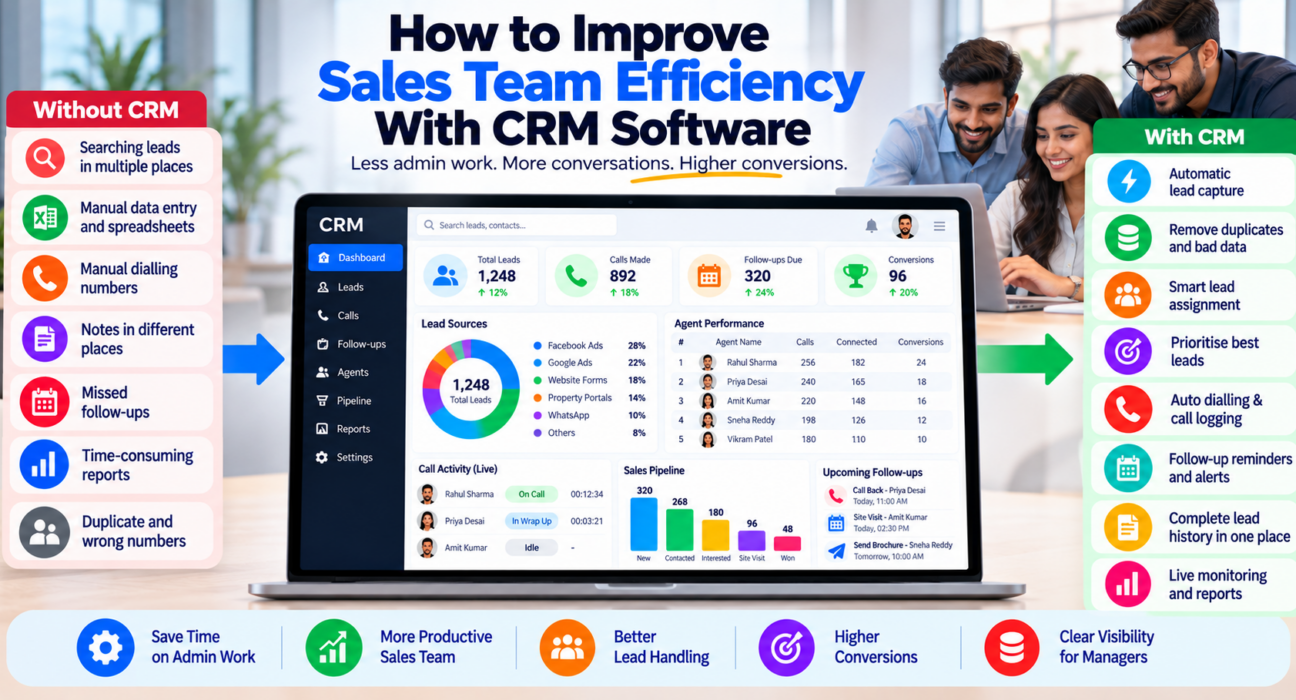
Where Sales Teams Lose Time
Before choosing tools, find where your time goes. Common time-wasters:
| Time-waster | What it costs |
|---|---|
| Collecting leads from ads, portals and forms by hand | Delay and copy-paste errors |
| Searching for lead details across sheets and chats | Agent time and missed context |
| Dialling numbers manually | Time between calls |
| Writing notes in several places | Duplicate effort and lost information |
| Remembering follow-ups | Missed callbacks |
| Manual daily reports | Manager time |
| Calling wrong numbers, duplicates or DNC contacts | Wasted calls and compliance risk |
Each of these can be reduced by using the right CRM features.
9 Ways a CRM Can Improve Sales Team Efficiency
1. Capture leads automatically
When leads from ads, portals and website forms flow into the CRM, nobody has to copy them by hand. This also shortens the gap between enquiry and first call.
2. Remove duplicates and bad data
A CRM that detects duplicate numbers and checks Do Not Call lists prevents wasted and risky calls. Clean data means every call has a purpose.
3. Route leads by clear rules
Assign leads by source, city, language or round-robin instead of manually. This reduces delay and arguments over who gets which lead.
4. Prioritise the best leads
Lead scoring or priority tags help agents call warmer leads first. This matters most when daily volume is high.
5. Reduce time between calls
Features such as auto dialling or click-to-call remove manual dialling. Calls are logged with duration and outcome automatically, so agents spend less time on notes.
6. Automate follow-ups and reminders
Every call should end with a next step and a date. The CRM then reminds the agent when it is due and alerts the manager when it is overdue. Our guide on how to automate sales lead follow-ups and reminders covers this in detail.
7. Keep full history in one place
When an agent opens a lead, they should see past calls, notes and stage. This avoids asking the customer the same questions twice and helps when leads are reassigned.
8. Give managers live visibility
Live dashboards show who is on a call, who is idle and where leads are stuck. Managers can step in during the day instead of finding problems at month-end.
9. Automate reporting
Reports on calls, connections, conversions and revenue by agent and by source should be generated by the system, not compiled by hand. This frees manager time for coaching.
How to Improve Sales Team Efficiency: Step by Step
1. Measure your baseline
Note current response time to new leads, daily calls per agent, overdue follow-ups and time spent on reports. You need a starting point to know what improved.
2. Map the lead journey
Write down every step from enquiry to closed deal, and mark where leads wait or get lost.
3. Fix the biggest delay first
If leads wait too long for a first call, start with capture and routing. If follow-ups are missed, start with reminders. Do not try to fix everything at once.
4. Standardise call outcomes
Use a short list such as Not Answered, Interested, Call Back, Not Interested, Wrong Number and Won. Every outcome should have a next action.
5. Simplify what agents must enter
Keep required fields to a minimum. If data entry is slow, agents will skip it and the CRM loses value.
6. Set response-time and follow-up targets
For example, a target for calling new leads and a rule that all callbacks must be completed on the due date. Choose targets your team can realistically meet.
7. Train and review
Train agents on a few core actions. Review the data weekly in a short meeting, and share what improved.
8. Coach using call data
Use call recordings and notes to find one improvement per agent at a time. Efficiency also comes from better calls, not just more calls.
Examples of Efficiency Gains in Practice
These are hypothetical examples to illustrate where time can be saved. They are not customer case studies.
Real estate: A team copies portal leads into a sheet every morning, so the first calls start late. Connecting lead sources to the CRM means leads appear and are assigned as they arrive.
Education: Counsellors keep follow-up dates in personal diaries. Moving callbacks into the CRM with reminders reduces missed calls and helps when a counsellor is on leave.
Insurance: A manager spends the evening collecting call counts on WhatsApp. Live reports replace this, and the evening is used to coach agents.
Recruitment: Recruiters call the same candidates twice. Duplicate checks and a shared call history prevent repeated contact.
Common Mistakes That Reduce Efficiency
- Buying a CRM without fixing the process. Software cannot decide who owns a lead or when to call.
- Too many fields and stages. Complexity slows agents down.
- Measuring only call volume. It rewards quantity over quality.
- Ignoring data quality. Importing duplicates and wrong numbers wastes time from day one.
- Over-automating messages. Too many automated messages can annoy leads. Follow consent and DNC rules, and check the current TRAI guidelines.
- Skipping training. Agents who do not understand the CRM will work around it.
- Not reviewing results. Without weekly review, small problems grow.
How TeleCallingCRM Supports Sales Team Efficiency
TeleCallingCRM is a telecalling CRM built for Indian outbound sales teams. Based on its website, relevant capabilities include:
- Lead capture: Integrations with Facebook and Instagram Lead Ads, Google Ads, 99acres, Housing, MagicBricks, JustDial, Sulekha, TradeIndia, Wix, WordPress and Google Sheets, plus CSV import.
- Clean and route: De-duplication, DNC checks and auto-distribution of leads.
- Prioritise: Lead scoring and tagging.
- Calling: A smart auto dialer, call tracking with duration and outcome, call recording and notes.
- Follow-ups and automation: Reminders, overdue alerts, recurring follow-ups and a no-code workflow builder.
- Messaging: WhatsApp templates, SMS and email.
- Visibility: A live view of agent activity, plus reports, leaderboards and exports.
- AI call analysis: Transcription, summaries, a quality score and coaching notes.
- Mobile app: For agents working outside the office.
For more on the monitoring side, see this post on TeleCallingCRM’s Live War Room and reports. If you are comparing options, this guide to choosing the best telecalling CRM gives a wider checklist, and the pricing page lists plans by team size.
It suits teams that work mainly through calls. If your sales process depends mostly on email sequences or long enterprise deal tracking, compare it with other tools. Whatever you choose, test it with a small group of agents first.
Quick Checklist
- Do leads enter the CRM automatically?
- Are duplicates and DNC numbers filtered?
- Are leads assigned by clear rules?
- Is every call logged with an outcome and next step?
- Do agents get reminders, and managers get overdue alerts?
- Can managers see live activity and reports?
- Is data entry short enough for agents to complete?
- Do we review results every week?
Frequently Asked Questions
How can a CRM improve sales team efficiency?
A CRM saves time by capturing leads automatically, assigning them by rules, logging calls, reminding agents about follow-ups and generating reports. Agents spend less time on admin, and managers get live visibility without chasing updates.
What is sales team efficiency?
It is the useful selling output a team achieves for the time, effort and money it spends. A team that makes fewer, better calls and follows up on time can be more efficient than one that simply makes more calls.
What are the biggest time-wasters for sales teams?
Common ones are manual lead copying, searching for lead details across sheets, manual dialling, duplicate calls, missed follow-ups and manual reporting. A CRM can reduce most of these, if the team uses it consistently.
How do I measure sales team efficiency?
Track response time to new leads, calls and connected calls per agent, follow-ups completed on time, conversion rate and revenue per agent. Compare against a baseline from before you changed anything.
Does a CRM reduce the number of people I need?
Not necessarily. A CRM usually helps the same team handle more leads and miss fewer, but results depend on process and training. Do not assume headcount savings without testing.
Is an auto dialer necessary for efficiency?
Not for every team. It helps high-volume calling teams by reducing manual dialling. Teams with fewer, longer, high-touch calls may gain more from reminders, history and reporting. Test what suits your workflow.
How long does it take to see efficiency improvements?
It varies. Quick wins, such as automatic lead capture and reminders, can show in the first few weeks. Larger changes, such as better coaching and reporting habits, usually take longer. Measure against your baseline.
Can small teams benefit from CRM efficiency features?
Yes. Even a team of five can lose leads to missed follow-ups and manual work. Choose a simple CRM, connect your main lead sources and start with reminders and basic reports.
Conclusion
Sales team efficiency comes from removing waste, not adding pressure: capture leads automatically, route them quickly, make every call count, remind agents of the next step and give managers clear numbers. Start with the biggest delay in your process and fix it first.
If your team sells by phone, consider sales calling software that combines lead capture, calling, follow-ups and reports in one place. Try it with your own leads and agents, and measure the change against your baseline.