Field Service Automation: 10 Processes You Can Automate
A rep punches in on paper, gets a job on WhatsApp, drives a longer route than needed, and files an expense claim a week later. Each step is small, but together they cost your business hours and money every day. Field service automation software replaces these manual hand-offs with a single connected workflow.
This guide covers what field service automation is, ten processes you can automate, how to choose the right software and where to start.
What Is Field Service Automation?
Field service automation is the use of software to handle repetitive field operations tasks such as scheduling, dispatch, attendance, routing, proof capture, approvals and reporting, without manual follow-up.
The software assigns work, guides the field employee through it, records proof, and updates managers in real time. People stay in charge of the decisions. The software takes over the paperwork and chasing.
It overlaps with field service management and field workforce management. Automation is the part that removes manual steps from those workflows.
Why Manual Field Operations Break Down
Manual processes work for a handful of people. As the team grows, the same habits create problems:
- No visibility. Once the team leaves the office, managers rely on phone calls to know who is where.
- Admin overload. Attendance, updates and expenses live in paper registers, chat groups and spreadsheets.
- Weak proof. Without evidence, a missed or fudged visit is hard to detect.
- No clean data. Without consistent data on visits, SLAs and outcomes, coaching and planning are guesswork.
Automation addresses each of these by capturing data at the point of work instead of reconstructing it later.
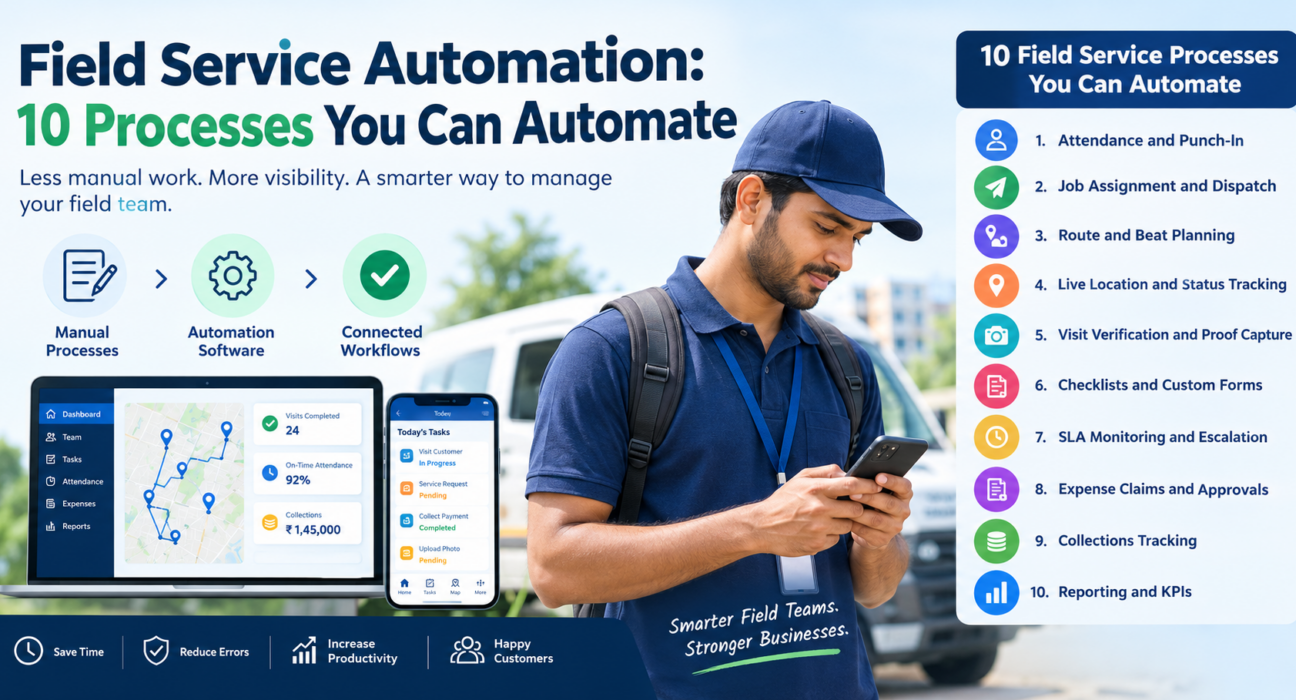
10 Field Service Processes You Can Automate
1. Attendance and Punch-In
Manual attendance is easy to dispute and easy to fake. Automated attendance records a GPS-stamped punch-in when the employee starts work.
Good systems use server time instead of the phone’s clock. They also add geofencing and mock-location detection. Managers see who is on duty without calling anyone.
2. Job Assignment and Dispatch
Assigning visits by phone call or message creates delays and mix-ups. With automation, a manager creates a task with a checklist, priority and SLA, and it reaches the right employee’s phone instantly.
Assignment can also be guided by location and workload, so the nearest available person gets the job.
3. Route and Beat Planning
Planning routes by hand takes time and rarely produces the most efficient order of stops. Route and beat-plan optimization sequences visits automatically, with distance and ETA for each stop.
The result is less time on the road and more time with customers. Reps can open navigation with a single tap.
4. Live Location and Status Tracking
Instead of asking “where are you?”, managers can watch the team on one live map. Each employee’s status, such as in transit, at customer or idle, updates as work progresses.
A GPS trail shows where each person actually went. Location features should apply only to on-duty staff who have given permission.
5. Visit Verification and Proof Capture
A visit that cannot be verified is a visit you cannot trust. Automated proof capture asks for a photo, signature or OTP before a job can close.
Auto check-in by geofence confirms the employee reached the location. Together these give you proof of presence and proof of work.
6. Checklists and Custom Forms
Paper forms get lost, filled in late or left blank. Digital checklists and custom forms make sure the required information is captured at the right moment.
Look for a form builder that lets you add fields without coding, so inspections, surveys and service reports match your process.
7. SLA Monitoring and Escalation
Service level agreements fail quietly when no one is watching the clock. Automated SLA monitoring starts a timer when a job is created and flags jobs at risk of breaching.
Managers can act before the deadline passes. Customer feedback and NPS collected after the visit help show service quality over time.
8. Expense Claims and Approvals
Expense handling is a common source of delay and leakage. Automated claims let employees attach receipt photos from the field, then route them through an approval chain to reimbursement.
Mileage and reimbursement calculations can be automated, and finance gets a clean, receipt-backed trail instead of a pile of spreadsheets.
9. Collections Tracking
For teams that collect payments in the field, a gap between collecting and recording is a risk. Automation records the amount and proof at the visit, then tracks it through to settlement.
Managers can see what has been collected, what is pending and which visits are overdue.
10. Reporting and KPIs
Compiling reports by hand means decisions are made on old data. Automated reporting builds dashboards from the data your team is already capturing.
Typical KPIs include:
- Visits completed per rep
- On-time attendance
- SLA compliance
- Expense cycle time
- Collection status
Leaderboards and trends show who needs coaching and which routes work.
Which Processes Should You Automate First?
Start with the processes that cause the most daily friction and are easiest to measure.
- Attendance and live tracking. These give immediate visibility and need little change from the team.
- Task assignment and proof of visit. These create accountability and clean data.
- Route planning. Once visits are reliable, optimize the order.
- Expenses, collections and SLAs. These protect revenue and service quality.
- Reporting. By now the data is flowing, so dashboards become useful.
Rolling out in stages helps your team adapt and lets you measure the impact of each change.
How to Choose Field Service Automation Software
Use this checklist when comparing tools:
| What to check | Why it matters |
|---|---|
| Works offline | Field locations often have poor network. Data should sync later. |
| Proof capture | Photo, signature and OTP make visits verifiable. |
| Attendance integrity | Server-time punch-ins, geofencing and spoof detection reduce fraud. |
| Route optimization | Cuts travel time and fits more visits into a day. |
| Configurable workflows | Forms, job types, approvals and SLAs should match how you work. |
| Mobile and web | Reps need a simple app. Managers need a control console. |
| Integrations | The tool should connect to your CRM, ERP, accounting or HR systems. |
| Clear pricing | Know what you pay as you add users. |
Be cautious of tools that only track location. GPS tracking shows where people are, but it does not assign work, verify visits or manage expenses.
How FieldExecutives Supports Field Service Automation
Businesses looking to simplify these processes can use field force management software such as FieldExecutives. It brings the workflows above into one platform with three connected apps: a mobile app for field employees, a web console for managers, and an admin portal for business owners.
Based on the FieldExecutives website, the platform covers:
- Geofenced attendance with server-time punch-in and spoof detection
- Live team map with a GPS trail
- Task assignment with checklists, priority and SLA timers
- Proof capture through photo, signature and OTP
- AI route and beat-plan optimization with distance and ETA per stop
- Expense claims with receipt photos and a two-level approval flow
- Collection tracking through to settlement
- Custom forms built without code
- Offline-first mobile app that syncs when the connection returns
- Real-time KPIs and leaderboards
[Internal Link Opportunity: Features page, https://fieldexecutives.com/features]
It is used by teams in areas such as field service and repair, logistics, FMCG distribution, banking and collections, telecom, and facility management. You can see how it applies to service teams on the field service and repair industry page.
The website lists figures such as travel time savings, but notes that these are illustrative and not guarantees. Your results will depend on your team, territory and processes.
Best Practices for Rolling Out Automation
- Map your current process first. Automating a broken process only makes it faster.
- Involve field staff early. A simple app that saves them time is adopted faster.
- Set clear rules. Define what proof is required and which approvals apply.
- Be transparent about tracking. Explain what is tracked, when and why.
- Start small. Pilot with one team or region, then expand.
- Review the data weekly. Use the reports to coach, not just to monitor.
Conclusion
Field teams lose time and money in small, repeated gaps: late attendance records, unclear assignments, unverified visits, delayed claims and manual reports. Field service automation closes these gaps by turning each step into a tracked, verifiable workflow.
You do not need to automate everything at once. Begin with attendance, tracking and task proof, then add routing, expenses, collections and reporting as your team gets comfortable. The right field service automation software should fit your workflow, work offline and give managers real-time visibility.