Telecalling CRM Implementation: A Step-by-Step Guide for Your Organization
Buying a CRM is the easy part. The harder part is getting twenty telecallers to use it every day, with clean data and a process everyone follows. A clear plan for telecalling CRM implementation saves you from half-used software, messy lead records and agents who quietly go back to spreadsheets.
This guide walks through the steps in a practical order, from setting goals to rolling out in phases. It is written for business owners, sales managers and CRM owners in India who are setting up a CRM for an outbound calling team.
What Is Telecalling CRM Implementation?
Telecalling CRM implementation is the process of setting up a CRM for outbound calling teams and getting them to use it properly. It covers defining goals, cleaning and importing leads, configuring users and rules, connecting lead sources, training agents and reviewing results. A good implementation leaves every lead with an owner, a status and a next action.
Notably, implementation is mostly about people and process. The software is only one part of it.
Before You Start: Three Things to Settle
Rushing into setup is the most common error. Instead, settle these three points first:
- A clear goal. For example, “call every new lead within 15 minutes” or “complete 90% of scheduled follow-ups”. Without a goal, you cannot judge success later.
- One owner. Someone, usually a sales manager or operations lead, must own the project and make quick decisions.
- A realistic timeline. Guides on CRM projects, such as LeadSquared’s implementation steps, recommend building buffer time and milestones into the plan, and rolling out in phases rather than all at once.
Step-by-Step Telecalling CRM Implementation Plan
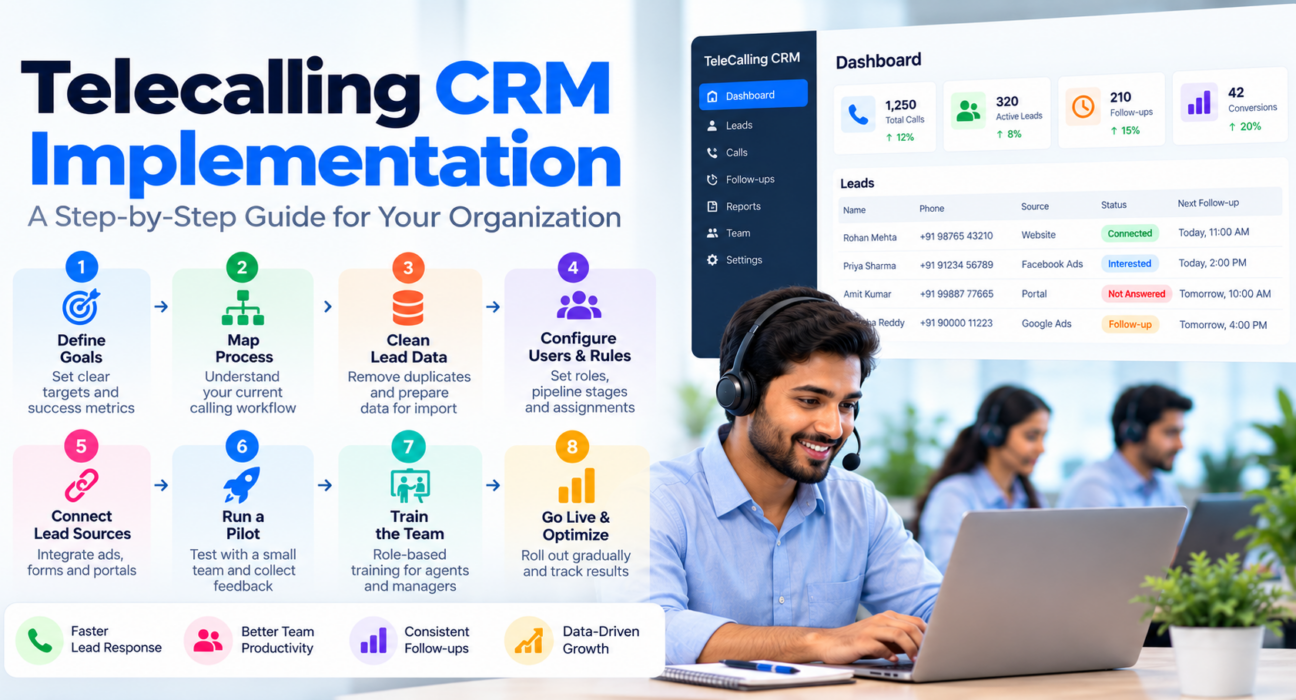
Step 1: Define goals and the numbers you will track
Pick three to five measures that reflect your goal. Common choices for telecalling teams include connection rate, follow-up completion, lead response time and conversion rate. Record today’s baseline, so that you can compare later.
Step 2: Map your current calling process
Write down how a lead travels today, from the first enquiry to a closed deal or a “not interested” outcome. Note where leads come from, who calls them, what outcomes agents record and where follow-ups get lost.
This map becomes your configuration blueprint. In particular, it tells you which pipeline stages, call outcomes and fields you need.
Step 3: Clean your lead data
Poor data is a classic reason CRM projects stall. Academic guidance on CRM projects, such as the Open University’s advice on implementing CRM, stresses cleaning and de-duplicating records, backing up the originals and testing a migration on a small sample first.
For a telecalling team, that means:
- Remove duplicate and invalid numbers.
- Standardise phone formats and names.
- Mark do-not-call numbers so that they are not dialled.
- Add a source, status and owner wherever they are missing.
- Save a backup copy of the original file.
Step 4: Configure users, roles and rules
Next, set up the system so that it mirrors your process. At a minimum, configure:
- Users and roles, so agents see only what they need and managers see the team.
- Pipeline stages and call outcomes, matching the map from Step 2.
- Custom fields, only for data you will actually use.
- Lead assignment rules, such as round-robin or language match.
- Follow-up rules, including reminders and overdue alerts.
- Calling hours and call scripts, where your tool supports them.
Keep the first setup simple. You can always add fields and automation later, whereas a cluttered setup tires agents quickly.
Step 5: Connect your lead sources
Most telecalling teams receive leads from ads, portals and website forms. Connecting these sources avoids manual copying and keeps lead response time short. Test each connection with a sample lead before you depend on it, and then check that duplicates are handled.
Step 6: Run a small pilot
Pilot the CRM with a few agents and one manager for about a week or two. Have them work real leads, log outcomes and schedule follow-ups, and then collect their feedback.
Use the pilot to answer practical questions:
- Do the pipeline stages match how agents really talk about leads?
- Does the dialer and mobile app work on the phones your team uses?
- Are any steps too slow or confusing?
- Do reports show the numbers you decided to track?
Step 7: Train the team
Training should be short and role-specific. Agents need to know how to dial, log an outcome, set a follow-up and read their own targets. Managers, on the other hand, need dashboards, reports and lead assignment.
Also explain why the change is happening. Agents adopt a tool faster when they understand that it removes manual work instead of adding surveillance.
Step 8: Roll out in phases and review
Move the remaining team in groups instead of all at once. After each group, fix issues before adding the next. Once everyone is live, review adoption and results weekly for the first month and then monthly.
Who Does What During Implementation
| Role | Main responsibilities |
|---|---|
| Project owner | Sets goals, approves configuration, keeps the timeline |
| Sales manager | Defines stages and outcomes, reviews reports, coaches agents |
| CRM admin | Sets up users, roles, rules and integrations |
| Agents (pilot group) | Use the tool daily and report problems |
| All agents | Log every call outcome and follow-up |
In a small team, one person may hold several of these roles. Even so, name an owner for each one.
Example: A Hypothetical Education Team
This is a hypothetical example to show how the steps fit together.
A coaching institute with ten counsellors receives admission enquiries from ads and its website. The manager sets one goal, which is to follow up with every enquiry within a day. After cleaning the old spreadsheet, the team imports leads, creates stages such as “enquiry”, “counselling booked” and “admitted”, and assigns leads by round-robin.
Two counsellors pilot the CRM for a week and ask for a clearer “parent will call back” outcome. The manager adds it, trains the rest of the team in two short sessions and then rolls out in two groups. Afterwards, weekly reports show whether follow-ups are being completed.
Common Implementation Mistakes
- Starting without a goal or an owner.
- Importing messy spreadsheets as they are.
- Copying a complicated process into the CRM on day one.
- Skipping the pilot and launching for everyone at once.
- Training only managers, and not agents.
- Never reviewing data entry quality after launch.
- Ignoring compliance basics such as do-not-call lists, calling hours and recording consent.
Things to Plan For
Every rollout has constraints. For instance, phone-based dialling depends on each agent’s device, permissions and network, so test on real handsets early. Likewise, features such as SMS may need separate registrations with your own provider, which takes time.
Free trials can also be short. TeleCallingCRM, for example, lists a 3-day trial, so prepare your cleaned lead file and user list before you sign up. That way, you can test the real workflow instead of spending the trial on setup.
How TeleCallingCRM Can Help
TeleCallingCRM is built for outbound sales and telecalling teams in India. According to its website, the setup flow is simple: create an account, import leads from a CSV file, and start calling. Imports include de-duplication and do-not-call checks.
For the configuration steps above, the platform lists role-based permissions, custom pipeline stages, custom fields and capture forms, assignment rules that consider whether agents are punched in, follow-up reminders and call scripts. It also lists integrations with several lead sources, a calling-hours window, and an Android and iOS app. You can review everything on the features page.
If you are still shortlisting tools, our guide on how to choose the best telecalling CRM for your business will help. Pricing is flat per plan, starting at ₹999 per month (excluding GST), as shown on the pricing page. Please confirm current details before deciding.
Frequently Asked Questions
What is telecalling CRM implementation?
It is the process of setting up a CRM for an outbound calling team. It includes setting goals, cleaning and importing leads, configuring users and rules, connecting lead sources, training agents and reviewing results after launch.
How long does telecalling CRM implementation take?
It depends on team size, data quality and the number of integrations. A small team with clean data can often start within days. Larger teams usually need a pilot and phased rollout, so plan for several weeks and add buffer time.
What should I do before implementing a telecalling CRM?
Set a clear goal, appoint a project owner, map your current calling process and clean your lead data. Also decide which numbers you will track, because these shape your stages, outcomes and reports.
How do I migrate leads from Excel to a CRM?
Remove duplicates and invalid numbers first, then standardise columns such as name, phone, source and status. Back up the original file, import a small sample to test and only then import the full list.
Do I need training for telecallers?
Yes, although it can be brief. Agents need to learn how to dial, log outcomes and set follow-ups, while managers need to learn reports and lead assignment. Short, role-specific sessions work better than one long session.
Why do CRM implementations fail?
Common causes include unclear goals, poor data, weak training and low adoption. Rolling out to everyone at once, without a pilot, also raises the risk. Regular reviews after launch help you catch problems early.
Should I roll out to the whole team at once?
Usually not. A pilot with a few agents shows practical problems before they affect everyone. After fixing them, roll out in groups and review results after each one.
Conclusion
Successful telecalling CRM implementation comes down to preparation, a simple first setup and steady follow-through. Set a clear goal, clean your data, pilot with a small group and then expand in phases, while checking adoption every week.
When you are ready to plan your own rollout, you can talk to the TeleCallingCRM team about your setup and compare it with the checklist above.