Call Recording Software for Sales Teams: Benefits & Best Practices
A sales manager listening to a lost deal often asks the same question: what actually happened on that call? Without a recording, the answer depends on memory, notes, or guesswork. This is the gap call recording software closes.
For outbound sales and telecalling teams, recorded calls are not just a compliance formality. They show how agents actually handle leads, which objections come up again and again, and where agents need coaching. Businesses evaluating telecalling software with built-in call recording usually want more than a storage tool. They want recordings that connect directly to lead history, follow-ups and call outcomes.
This article explains what call recording software does and why it matters for sales teams. It covers how the software works and what Indian law expects from businesses. It also covers the best practices that separate teams who use recordings well from teams who just store audio files nobody reviews.
What Is Call Recording Software?
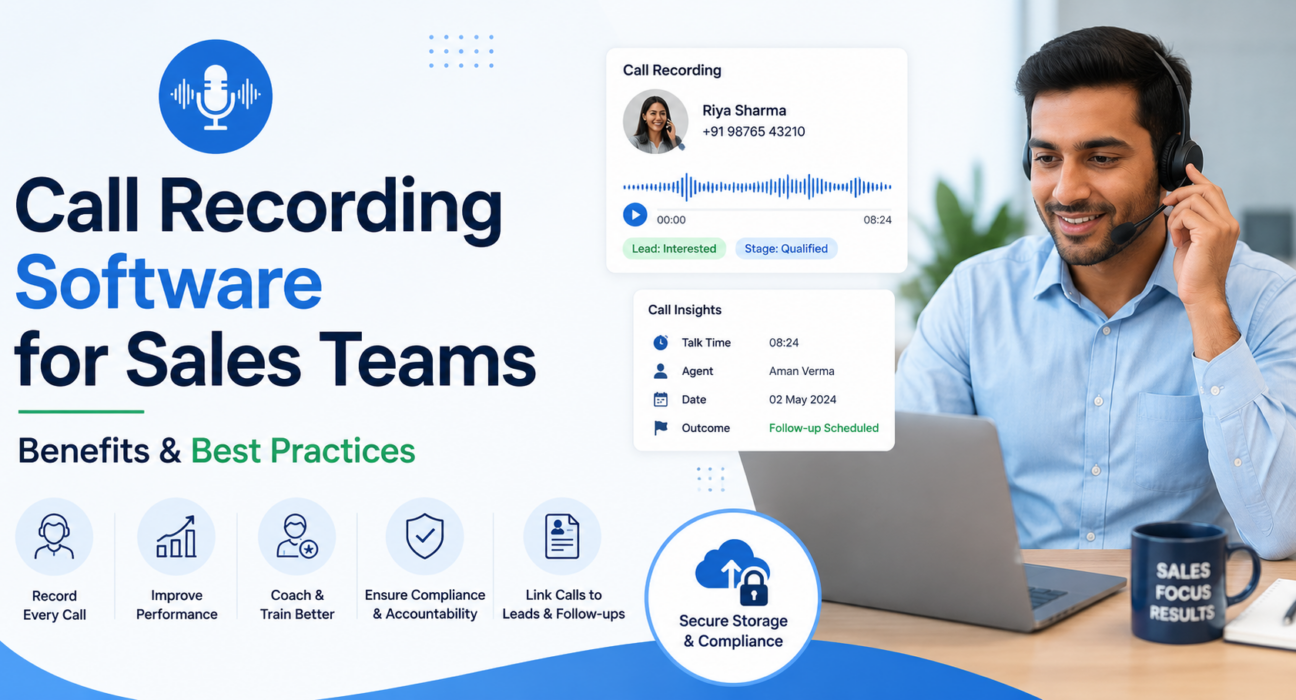
Call recording software automatically captures audio from sales or customer calls, made through a dialer, mobile app or VoIP system. It stores the audio for later playback, review, coaching or compliance checks. In sales-focused platforms, the software usually links each recording to the lead or customer record instead of storing it as a standalone file.
How Call Recording Software Works for Sales Teams
Most call recording tools built for sales follow a similar flow:
- Capture – The system records the call automatically when an agent dials or receives a call through the connected line.
- Storage – The software saves the recording, usually with encryption, and attaches it to the relevant lead or contact record.
- Access – Managers and, depending on permission settings, agents can play back the recording from within the CRM.
- Review – Teams use recordings for coaching, quality checks, dispute resolution, or training new hires.
- Retention – Businesses keep recordings for a set period, based on company policy or legal requirements, then delete or archive them.
The value comes from steps 3 and 4. A recording nobody listens to is just storage cost. A recording tied to lead management software is far more useful. A manager can see the call, the lead’s stage and the follow-up history together.
Is Call Recording Legal for Sales Teams in India?
Yes, businesses in India can record sales calls, but they need to follow specific legal requirements. Indian law does not require both parties to give explicit written consent before every call. But businesses must disclose that they are recording the call, and they must use the recording only for stated, legitimate purposes.
A few points sales and compliance teams should know:
- Implied consent is generally accepted. A recorded announcement such as “this call may be recorded for quality and training purposes” is a common and accepted way to disclose recording. The law treats continuing the call after that notice as implied consent.
- The Indian Telegraph Act, 1885 restricts unauthorised interception of calls by parties who are not participants in the conversation. This is more relevant to third-party wiretapping than to a business recording its own sales calls.
- The Digital Personal Data Protection (DPDP) Act, 2023 applies to recorded voice data because it counts as personal data. Businesses need to state why they are collecting it and limit its use to that stated purpose. They must also store it securely and delete it when it is no longer needed.
- The Bharatiya Sakshya Adhiniyam (BSA), 2023 sets out how businesses can use recordings as evidence. It includes certification requirements for presenting a recording in a legal proceeding.
This is general information, not legal advice. A company handling sensitive data, such as insurance, finance or healthcare, should confirm its recording and disclosure practices with a qualified lawyer first.
Benefits of Call Recording Software for Sales Teams
1. Faster, more accurate coaching
Instead of relying on an agent’s summary, managers can listen to exactly what happened on the call. This makes coaching specific. A manager can point to the exact moment an agent missed a customer objection or let a chance to close slip by, instead of giving general feedback.
2. Consistent quality checks
Recordings let managers audit calls against a script or quality checklist without sitting beside every agent. This is especially useful for teams with 10 or more telecallers, where live monitoring of every call is not practical.
3. Better onboarding for new agents
New hires can listen to recordings of strong calls that experienced agents have handled. This shortens the learning curve compared to only reading a script or sitting through classroom training.
4. Dispute resolution and accountability
When a customer disputes what an agent promised on a call, or a lead claims nobody contacted them, a recording settles the question quickly. This protects both the business and the agent.
5. Better understanding of objections and drop-offs
Reviewing recordings across multiple calls reveals patterns — a pricing objection that comes up repeatedly, or a stage in the pitch where prospects lose interest. This is harder to spot from call notes alone.
6. Support for compliance requirements
For regulated industries like insurance, financial services and lending, recordings provide a documented trail of what an agent disclosed to a customer. This can matter during audits or regulatory review.
Real-World Examples
These examples are illustrative, not case studies of specific customers.
Real estate. A telecalling team following up on property inquiries can use call recordings to check whether agents correctly share project details, RERA disclosures and pricing. Reviewing calls also helps identify pitch angles that lead to more site visits.
Insurance. An insurance sales team can use recordings to confirm that agents made mandatory disclosures before selling a policy. This reduces the risk of mis-selling complaints.
Education. Managers can coach admissions counsellors using recordings of calls that successfully converted enquiries into applications.
Recruitment. Recruitment teams calling candidates can review recordings to check how consistently different recruiters ask screening questions.
Financial services and lending. Loan or collections teams can use recordings to confirm that agents followed calling-hour rules and required disclosures, which matters for regulatory compliance.
Best Practices for Using Call Recording Software
- Always tell customers you are recording the call. Use a clear announcement at the start of the call. This is both good practice and generally required under Indian data protection law.
- Set a retention policy. Decide how long to keep recordings — for example 90 or 180 days — based on business need and legal requirements. Configure automatic deletion rather than storing everything indefinitely.
- Control who can access recordings. Agents should typically only access their own calls; managers and admins may need broader access. Role-based access reduces misuse and protects customer privacy.
- Review recordings regularly, not only after a complaint. Teams that only pull up recordings during disputes miss most of the coaching value. Build a habit of periodic spot-checks.
- Use recordings for coaching, not just monitoring. Framing call reviews as a punishment tool lowers agent morale. Framing them as a coaching tool improves both performance and buy-in.
- Connect recordings to lead and follow-up context. A recording is far more useful when a manager can also see the lead’s stage, previous calls and next follow-up date in the same view. This beats searching for the audio file separately.
- Use transcription and summaries where available. Manually listening to every call does not scale. AI-generated transcripts and summaries help managers scan more calls in less time and flag the ones that need a full listen.
- Store recordings securely. Encrypted storage and secure playback matter, particularly when calls include personal or financial information.
Common Mistakes to Avoid
- Recording calls without informing customers or agents.
- Storing recordings with no retention or deletion policy.
- Giving every team member unrestricted access to all recordings.
- Using recordings only to catch mistakes, never to reinforce good calls.
- Treating call recording as a standalone tool disconnected from lead management software and follow-up tracking.
- Letting recordings pile up without ever reviewing them, which defeats the purpose of recording in the first place.
How TeleCallingCRM Supports Call Recording for Sales Teams
TeleCallingCRM records sales calls automatically as part of its dialer and stores them with encryption. The platform links each recording to the relevant lead. A manager reviewing a call can then see the lead’s stage, call history and follow-up status in the same place, instead of switching between separate systems.
The platform also includes automatic transcription in English, Hindi and Hinglish. It adds a short AI-generated call summary, sentiment tagging and a quality score with coaching notes. This reduces how much managers need to listen manually for routine quality checks. Access to recordings is role-based, so agents generally see their own calls while managers and admins get broader visibility. Retention is configurable, so businesses can set an automatic deletion period that matches their internal policy. The same CRM for telecallers also enforces Do Not Call (DNC) and calling-hour rules.
Call recording works best for sales teams when it sits inside the same system as lead tracking and follow-up management, rather than as a separate tool. This guide on choosing a call center CRM covers that approach for growing sales operations.
Frequently Asked Questions
Is it legal to record sales calls in India without written consent? Yes, in most business contexts. Indian law generally accepts implied consent through a recorded disclosure at the start of the call. Businesses must still limit use of the recording to stated purposes and follow data protection requirements under the DPDP Act, 2023.
How long should a business keep call recordings? There is no single legal minimum for sales calls in most industries. Businesses typically set their own retention period, often between 90 and 180 days, based on operational need. Regulated industries may have specific requirements and should confirm these separately.
Does call recording software slow down calling speed? No. Recording runs in the background of the call and adds no extra steps for the agent. The system usually turns it on automatically when the call starts.
Can businesses use call recordings as evidence in a dispute? Yes, recordings can support internal disputes and, in some cases, legal proceedings. Formal evidentiary use may require certification under the Bharatiya Sakshya Adhiniyam, 2023.
What is the difference between call recording and call monitoring? Call recording saves the audio for later playback. Call monitoring, sometimes called call barging or live listening, allows a manager to listen to a call as it happens. Many sales calling software platforms offer both.
Should managers review every call manually? Not necessarily. Most teams cannot manually review every call at scale. This is why transcription, AI summaries and quality scores are useful, since they help managers prioritise which calls need a full listen.
Is call recording only useful for large sales teams? No. Even a team of five telecallers benefits from recordings for onboarding, dispute resolution and consistent quality. The review process can simply be lighter than for a 50-agent call centre.
Conclusion
Call recording software gives sales teams something notes and memory cannot: an accurate record of what agents actually said on a call. Used well, with clear disclosure and a sensible retention policy, it becomes a coaching tool and a compliance safeguard. Connect it to lead and follow-up data and it also becomes a way to understand what is really happening on the phones. Teams comparing options for lead follow-up software should look for call recording that works alongside lead tracking, not as a separate system. That combination is what actually makes recordings useful day to day. You can see how this works on the TeleCallingCRM pricing page, where every plan includes call recording as a standard feature.