Best Recruitment CRM for Recruitment Agencies to Manage Candidate Leads
A recruiter’s day rarely goes to plan. You source new candidates, screen resumes, follow up on interviews, and chase offer acceptances, often all at once. When you manage this across WhatsApp chats, spreadsheets and sticky notes, candidates slip through the cracks. And when a good candidate goes silent, you often lose the placement to a competitor.
This is exactly the problem a recruitment CRM solves. If your agency or in-house talent team handles even a moderate volume of candidates, you need a dedicated system for tracking candidate leads and follow-ups. Otherwise, your pipeline leaks. Agencies exploring a recruitment CRM often start by forcing a generic sales CRM to do the job, then realise recruiting needs its own workflow entirely.
What Is a Recruitment CRM?
A recruitment CRM is software that helps recruiters manage candidates the way a sales CRM manages leads, but it shapes the workflow around the hiring journey instead of a sales journey.
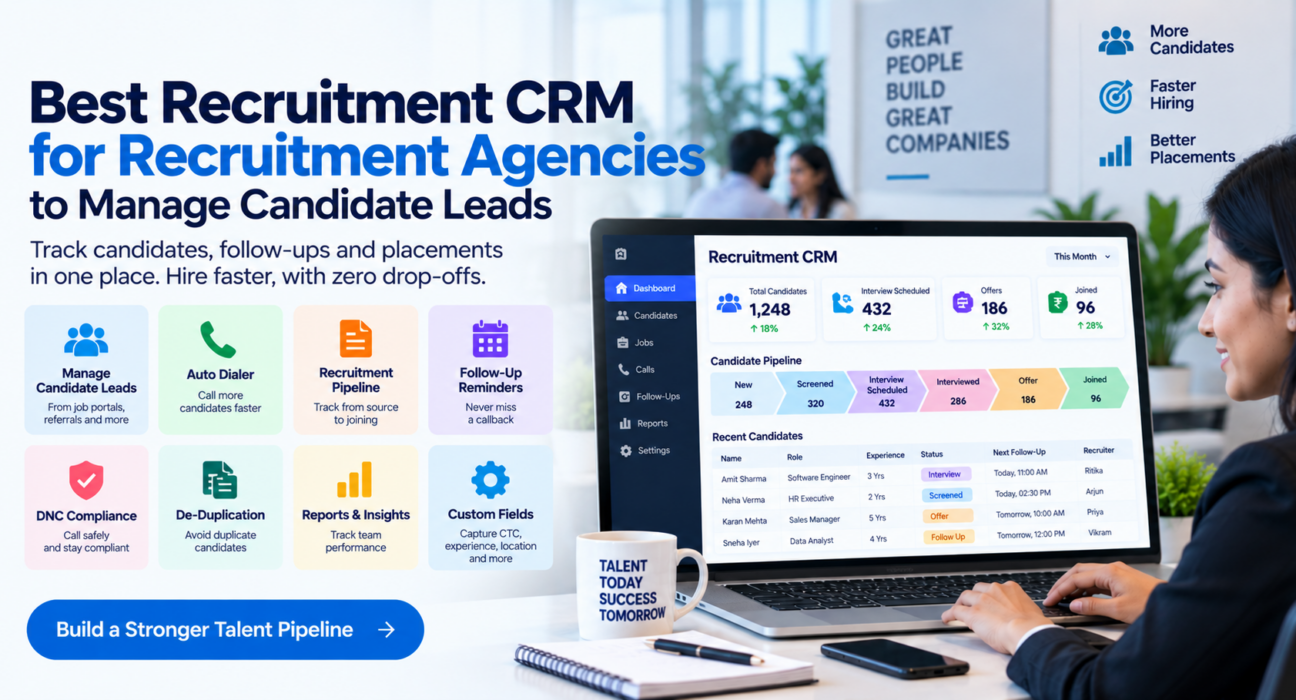
Instead of generic stages like “New,” “Contacted,” and “Closed,” a recruitment CRM tracks candidates through stages such as sourced, screened, interview scheduled, interviewed, offer, and joined. It centralises resumes, call notes, CTC details, and interview feedback in one place. As a result, recruiters always know where a candidate stands and what to do next.
So how does this differ from an Applicant Tracking System (ATS)? An ATS usually organises hiring around job postings and structured internal HR workflows. A recruitment CRM, on the other hand, focuses on high-volume, relationship-driven, calling-heavy recruiting, which is exactly what staffing agencies and RPO teams do every day.
Why Recruitment Agencies Struggle Without One
Most agencies don’t lose candidates because of bad sourcing. Instead, they lose them because of poor follow-up. A few patterns show up again and again:
- Candidates go cold between interview and offer. Without reminders, a recruiter forgets to call back, so the candidate accepts another offer.
- Duplicate calling happens. Two recruiters call the same candidate from two different sourcing channels because no single record exists.
- Pipeline visibility disappears. A manager can’t answer “how many candidates are at interview stage this week?” without manually checking spreadsheets.
- Context gets lost. A recruiter takes leave, and the person covering for them has no record of past conversations with a candidate.
- Compliance gaps creep in. Teams call numbers on Do Not Disturb (DNC) or National Customer Preference Registry lists because no automatic check catches them.
These aren’t failures of effort. They’re failures of process, and that’s exactly what a recruitment CRM fixes, without replacing the recruiter’s judgment.
Key Features to Look for in a Recruitment CRM
Before you compare vendors, it helps to know what actually matters for a recruiting workflow, as opposed to a generic sales CRM.
1. A Candidate-Specific Pipeline
Look for stages that map to hiring, not generic sales stages. A useful pipeline usually looks like this:
- New Candidate
- Screened
- Interview Scheduled
- Interviewed
- Offer
- Joined
- Dropped
Notice that “Dropped” gets its own stage. This matters because it lets your team see exactly where candidates exit the pipeline, whether after screening, after interview, or after offer, instead of watching them simply disappear from view.
2. Custom Fields Built for Recruiting
Generic CRMs capture “company” and “deal value.” Recruiting, however, needs different data captured on every call:
| Field | Why it matters |
|---|---|
| Role applied for | Filters candidates by open requisition |
| Experience | Quick screening against role requirements |
| Current CTC | Salary negotiation context |
| Expected CTC | Fitment against budget |
| Notice period | Predicts joining timelines |
| Location | Relevant for on-site or hybrid roles |
| Source | Tracks which channel brings quality candidates |
Without these fields built in, recruiters end up maintaining a parallel spreadsheet anyway, which defeats the whole purpose of having a CRM.
3. Auto Dialer With DNC and De-duplication
High-volume recruiting means dozens of outbound calls a day per recruiter. So look for a dialer that queues the next candidate automatically, skips numbers on Do Not Call lists, and blocks duplicate entries. This alone saves real time and keeps your calling compliant.
4. Automatic Lead Capture From Job Portals
Candidates come from job portal applications, referrals, website forms, and sourcing tools. That’s why a recruitment CRM should accept webhook integrations from job portals, or at least import via CSV and Google Sheets, so candidates land in the pipeline automatically and de-duplicated, instead of getting copied over by hand.
5. Follow-Up Reminders and Callback Scheduling
The single biggest reason candidates go cold is a missed follow-up. So look for smart callback reminders, overdue alerts, and recurring follow-ups, so a candidate waiting on interview feedback or an offer decision never gets forgotten.
6. Team Visibility and Reporting
A hiring manager or team lead needs to see, at a glance, how many candidates sit at each stage, which recruiter closes positions fastest, and where the pipeline thins out. Live dashboards and leaderboards make this visible instantly, without any manual reporting.
7. Mobile Access
Recruiters often move between client visits, interviews, and calls. That’s why a mobile app matters: it lets them log outcomes and check follow-ups from a phone, so the pipeline stays updated in real time instead of only at day’s end.
How Recruitment Agencies Actually Use a CRM Day to Day
To make this concrete, here’s a hypothetical (illustrative) walkthrough of how a staffing agency might use a recruitment CRM in practice.
A candidate applies through a job portal for an open role. The application lands automatically in the CRM, tagged with source and role. Next, the system auto-assigns a recruiter, and the auto dialer queues the call. During the call, the recruiter logs experience, current CTC, expected CTC, and notice period directly against the candidate record, then moves the stage to “Screened.”
If the candidate gets shortlisted, the recruiter schedules the interview inside the CRM and sets a follow-up reminder for the next day. After the interview, the recruiter logs feedback, and once an offer goes out, sets another reminder to check on acceptance before the notice period runs down. Throughout this process, a manager can see exactly how many candidates from each source convert to “Joined,” without asking anyone for a status update.
Recruitment CRM vs Generic Sales CRM
| Aspect | Recruitment CRM | Generic Sales CRM |
|---|---|---|
| Pipeline stages | Sourced → Screened → Interview → Offer → Joined | Lead → Contacted → Proposal → Closed |
| Key data fields | CTC, notice period, experience, role | Deal value, company, product interest |
| Lead sources | Job portals, referrals, career pages | Ads, website forms, cold lists |
| Follow-up cadence | Interview and offer stage reminders | Sales cycle reminders |
| Best fit for | Staffing agencies, RPO, in-house TA teams | Sales and business development teams |
You can technically repurpose a generic sales CRM for recruiting. In practice, though, recruiters usually end up fighting the software to make deal stages and fields mean something they weren’t designed for.
Common Mistakes When Choosing a Recruitment CRM
- Picking a tool with rigid, sales-only stages, then trying to force a recruiting workflow into it.
- Ignoring mobile access, even though a large part of recruiting happens on the move or between client visits.
- Overlooking compliance features like DNC checks, which matter for outbound-heavy recruiting teams.
- Choosing based on price alone, without checking whether the pipeline stages and custom fields actually fit recruiting.
- Skipping integration checks, instead of confirming the CRM connects with the job portals and sourcing channels your agency already uses.
How TeleCallingCRM Can Help
TeleCallingCRM offers a dedicated recruitment CRM setup built specifically for staffing agencies, RPO teams and in-house talent acquisition. It comes with a pipeline pre-built for recruiting: New Candidate, Screened, Interview Scheduled, Interviewed, Offer, Joined and Dropped, along with candidate-specific fields for role, experience, current CTC, expected CTC, notice period, location and source.
Candidates flow in automatically through job-portal webhooks, website forms, referrals or Google Sheets, while the built-in auto dialer queues calls sequentially and skips DNC numbers. Recruiters get follow-up reminders so candidates don’t go cold between interview and offer stages, and managers get a live view of pipeline health through dashboards and team reports. On top of this, a mobile app supports recruiters working outside the office.
This setup works well whether your agency runs high-volume RPO screening or more relationship-driven staffing placements. Either way, the underlying need stays the same: track candidates and follow up on time.
Frequently Asked Questions
What is the difference between a recruitment CRM and an ATS?
An ATS typically organises hiring around job postings and structured stages for internal HR use. A recruitment CRM, however, focuses on high-volume, calling-heavy recruiting, with a pipeline and fields designed around candidate relationships and follow-ups, which suits staffing agencies and RPO teams better.
Do small recruitment agencies need a CRM, or is a spreadsheet enough?
A spreadsheet can work fine for very low candidate volumes. But once your agency handles multiple open roles and dozens of candidates weekly, follow-ups start slipping, and a CRM with reminders and pipeline visibility becomes worth the switch.
Can a recruitment CRM pull candidates from job portals automatically?
Yes. Many recruitment CRMs support webhook integrations with job portals, so candidate applications land directly in the pipeline instead of getting copied over manually from each portal.
What fields should a recruitment CRM capture for each candidate?
At minimum, capture role applied for, experience, current CTC, expected CTC, notice period, location and lead source. These fields let recruiters filter and report on candidates meaningfully.
How does a recruitment CRM help reduce candidate drop-off?
It sets automatic follow-up reminders at each pipeline stage, especially between interview and offer, and between offer and joining, so no candidate waits without a reason.
Is an auto dialer useful for recruitment teams?
Yes, especially for agencies making a high volume of outbound calls daily. An auto dialer queues candidates automatically and can skip Do Not Call numbers, which saves recruiters time compared to manual dialing.
Can recruitment CRMs be used on mobile?
Yes, many recruitment CRMs, including TeleCallingCRM, offer mobile apps so recruiters can log call outcomes, check follow-ups and manage candidates while away from their desk.
Conclusion
Choosing the best CRM for a recruitment agency comes down to one question: does it match how recruiting actually works, or does it force recruiters to adapt to someone else’s sales process? A good recruitment CRM should offer a candidate-specific pipeline, the right custom fields, automatic lead capture from job portals, follow-up reminders, and clear visibility for managers, all without turning candidate management into extra admin work.
If you want to see how this looks in practice, explore TeleCallingCRM’s recruiting and staffing setup to understand how candidate pipelines, auto-dialing and follow-up reminders work together for hiring teams.