How to Improve Call Center Agent Efficiency With CRM Software
Your agents are busy all day, yet the numbers barely move. Calls are made, but too much time goes into dialing by hand, hunting for old notes and remembering who asked for a callback. That lost time is where call center agent efficiency quietly drops.
Most of these delays are process problems, not people problems. Teams can improve call center agent efficiency with CRM software built for calling workflows by removing repetitive tasks, giving agents context and making follow-ups automatic. This guide explains how, which metrics to track and which mistakes to avoid.
What Is Call Center Agent Efficiency?
Call center agent efficiency is how much useful work an agent completes in the time available. Useful work means productive conversations, resolved queries or conversions, compared with the time spent on calls, notes, searching and waiting.
Efficiency is not the same as speed. An agent who rushes through calls but forgets follow-ups is fast, not efficient.
Where Agent Time Is Usually Lost
Before choosing any tool, find the leaks. These are the most common ones:
- Dialing numbers manually and waiting between calls
- Searching spreadsheets or chat apps for earlier conversations
- Typing long notes after every call
- Calling duplicate leads or calling at the wrong time
- Missing callbacks because reminders live in personal notebooks
- Receiving leads that do not match the agent’s language or skill
- Switching between a dialer, WhatsApp, a sheet and a report file
Each delay looks small. Across a team and a month, they add up to many lost hours.
How CRM Software Improves Call Center Agent Efficiency
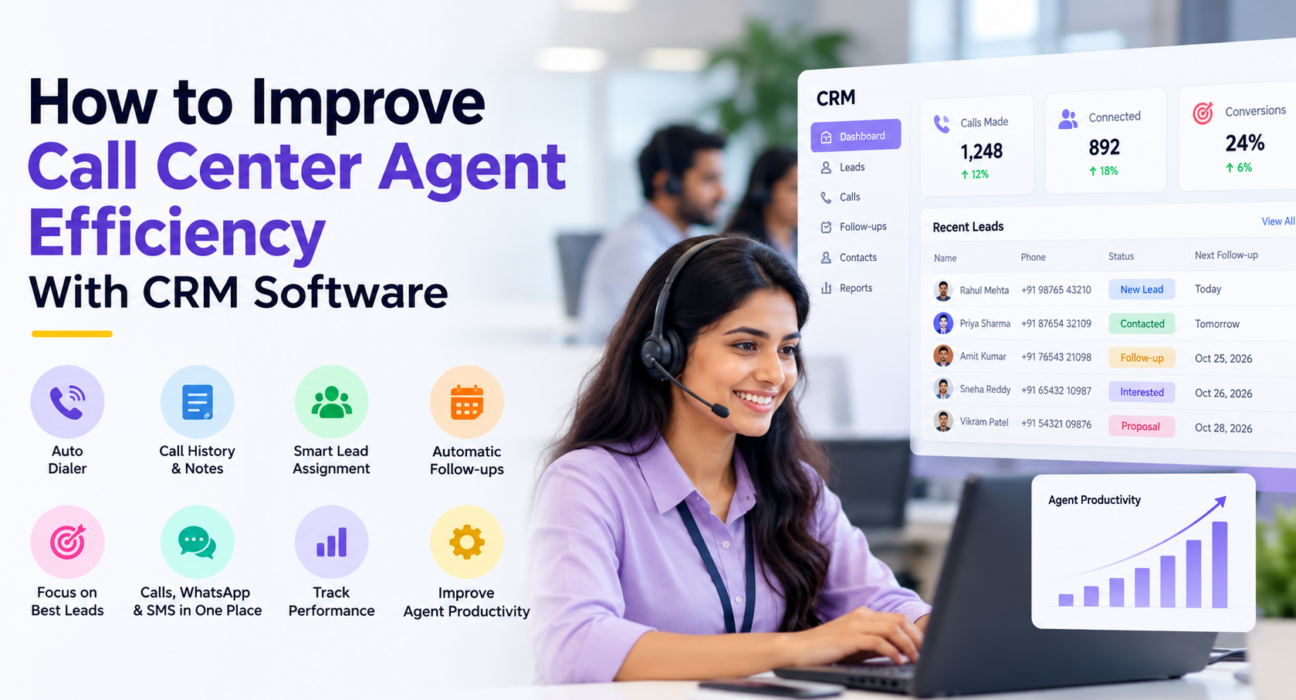
A CRM does not make agents work harder. It removes the friction around the conversation. These are the seven areas where it helps most.
1. Reduce Manual Dialing and Data Entry
An auto dialer moves through an assigned lead list in order, so agents do not type numbers or wait between calls. Call duration can be captured from the phone’s call log, and the outcome can be logged in one tap. More of the shift goes to talking.
2. Give Agents Full Context Before the Call
When call history, notes, source and tags sit on one screen, agents stop asking customers to repeat themselves. Call scripts shown on the call screen also help new agents stay consistent. Context shortens calls and improves the customer’s experience.
3. Route the Right Lead to the Right Agent
Manual lead forwarding wastes manager time and delays the first call. Assignment rules can distribute leads by round-robin, language or fixed owner. Availability-aware routing sends leads only to agents who are on shift.
4. Make Follow-Ups Automatic
Most lost leads are not rejected. They are forgotten. Scheduled callbacks, reminders and overdue alerts keep follow-ups from depending on memory. Today, Overdue and Upcoming lists let agents start the day with a clear plan.
5. Focus Agents on the Best Leads First
Lead scoring (Hot, Warm, Cold) and priority levels help agents spend peak hours on leads most likely to respond. Without them, agents often work lists in the order they arrive.
6. Keep Every Channel in One Place
If an agent must leave the CRM to send a WhatsApp message or SMS, time is lost and history gets split. A unified thread of calls, SMS, email and WhatsApp keeps the full conversation together. A mobile app also helps field and remote agents use the same system.
7. Monitor Performance and Coach With Data
Managers cannot coach what they cannot see. Dashboards, leaderboards and live activity views show who is on a call, who is idle and where targets are slipping. Our post on the live war room and reports explains this in more depth. For the customer-experience side, see how call center software supports CSAT.
Metrics to Track for Call Center Agent Efficiency
Pick a few metrics and review them weekly. Avoid judging agents on one number.
| Metric | What it tells you | Caution |
|---|---|---|
| Connection or answer rate | Share of dials that reach a person | Depends on lead quality and calling time |
| Talk time vs worked hours | How much of the shift goes to conversations | Very high talk time can mean long, unproductive calls |
| Idle time | Gaps between calls | Check for system or lead-supply problems first |
| Follow-up completion | Callbacks done on time | Needs reliable reminders to be meaningful |
| Conversion rate by agent and source | Outcomes, not just activity | Small samples can mislead |
| Call quality score | Consistency of conversations | Combine with human review |
Inbound support teams also track average handle time and first-call resolution. These matter when customers call you with problems, rather than your agents calling leads.
A Hypothetical Example: A Small Admissions Team
This is an illustration, not a case study. Imagine an education institute with eight counsellors. Enquiries arrive from ads and the website, and counsellors call from a shared spreadsheet.
Two counsellors often call the same student. Callback dates sit in personal notebooks. The manager spends the morning forwarding leads and the evening building a report.
With a CRM, each enquiry lands automatically and is assigned by rule. The counsellor sees earlier notes before dialing. Callbacks appear as reminders, and the manager reads the dashboard instead of building a report. The work is the same, but far less time goes to coordination. An education CRM is designed around this kind of workflow.
A 30-Day Plan to Get Started
- Week 1: Set a baseline. Record current connection rate, follow-up completion and calls per agent. Clean your lead data and remove duplicates.
- Week 1: Define your process. Agree on pipeline stages, call outcomes and rules for lead assignment.
- Week 2: Connect lead sources. Bring in leads from ads, portals and forms so nothing is copied by hand.
- Week 2: Train in small groups. Show agents the dialer, outcome logging and follow-up scheduling on real leads.
- Week 3: Enforce one habit. Every call ends with an outcome, a short note and a next step.
- Week 4: Review and coach. Compare results with your baseline, then coach using call examples and dashboard data.
Common Mistakes to Avoid
- Measuring only call volume. More calls with poor outcomes is not efficiency.
- Using monitoring as surveillance. Share the data with agents and use it for coaching.
- Adding too many mandatory fields. Long forms slow every call.
- Skipping training. A good tool used badly delivers little.
- Ignoring agent feedback. Agents notice friction first.
- Overlooking compliance. Respect Do Not Call preferences and permitted calling hours.
What a CRM Cannot Fix
A CRM supports good processes. It cannot fix weak scripts, poor lead quality, unrealistic targets or understaffing. If leads are unqualified, faster dialing only reaches more wrong numbers faster. Fix these basics alongside the software.
How TeleCallingCRM Can Help
TeleCallingCRM is built for outbound telecalling and sales calling teams. Based on its website, the product includes:
- A smart auto dialer with automatic call-duration capture and one-tap outcome logging
- Assignment rules, including round-robin and language matching
- Lead scoring, priority levels, tags and call history on each lead
- Follow-up reminders, overdue alerts and smart follow-up timing
- SMS, email and WhatsApp messaging in a unified thread
- A live war room, leaderboards, connection and answer rate reports, and attendance and utilization views
- Android and iOS apps for agents
- DNC enforcement and a configurable calling-hours window
It also lists optional AI call analysis, which provides a summary, sentiment and a quality score with coaching notes. According to the website, this runs only when a business turns it on. You can explore everything on the features page, and the pricing page lists the current plans and the free trial.
One limitation to note: the website focuses on outbound telecalling. If your centre mainly handles inbound queues, confirm the exact capabilities in a demo before deciding.
Frequently Asked Questions
What is call center agent efficiency?
It is the amount of useful work an agent completes in the time available, such as productive conversations, resolved queries or conversions. It balances speed with outcomes. Handling calls quickly while missing follow-ups does not count as efficient.
How can CRM software improve call center agent efficiency?
A CRM saves agent time by automating dialing and logging, showing call history before each call, assigning leads by rule and scheduling reminders. It also gives managers visibility, so coaching is based on data rather than guesswork.
Which metrics measure call center agent efficiency?
Common ones are connection rate, talk time against worked hours, idle time, follow-up completion, conversion rate and call quality. Inbound teams also use average handle time and first-call resolution. Review several metrics together, not one in isolation.
What is the difference between agent efficiency and agent effectiveness?
Efficiency is about using time and effort well. Effectiveness is about achieving the right result, such as a sale or a resolved issue. Good teams need both. Fast calls with poor outcomes are efficient at nothing.
Does an auto dialer improve agent efficiency?
Usually yes, for outbound teams, because agents spend less time dialing and waiting. The gain depends on lead quality, calling hours and compliance with DNC rules. An auto dialer cannot fix poor data or weak scripts.
Can small teams benefit from a call center CRM?
Yes. Small teams often lose time to spreadsheets, duplicate calls and forgotten callbacks. A simple CRM with lead assignment, follow-up reminders and a basic dashboard can help, even with a handful of agents.
Does TeleCallingCRM suit inbound call centers?
The website positions it for outbound telecalling and sales calling. I could not verify inbound queue features, so inbound-heavy teams should ask for a demo and confirm their requirements first.
Conclusion
Better call center agent efficiency comes from removing friction: less manual dialing, fewer searches for context, clearer lead ownership and follow-ups that no longer depend on memory. Start by measuring where time goes, then fix the biggest leaks one at a time.
If your team makes outbound calls, look at lead follow-up software and call tracking features to see which of these steps you can automate first.