GPS Tracking for Field Employees: Complete Guide for Businesses
If half your team is out visiting clients, making deliveries, or fixing equipment on-site, you probably already feel the blind spot. You know they’re working. You just don’t always know where, or how efficiently. That’s the exact problem GPS tracking for field employees is built to solve — it gives you a live, verifiable picture of where your team actually is during the workday, instead of relying on end-of-day updates and trust.
This guide walks through how it actually works, why businesses adopt it, the legal side most people worry about, and how to roll it out without your team feeling like they’re being watched for the wrong reasons.
What Is GPS Tracking for Field Employees?
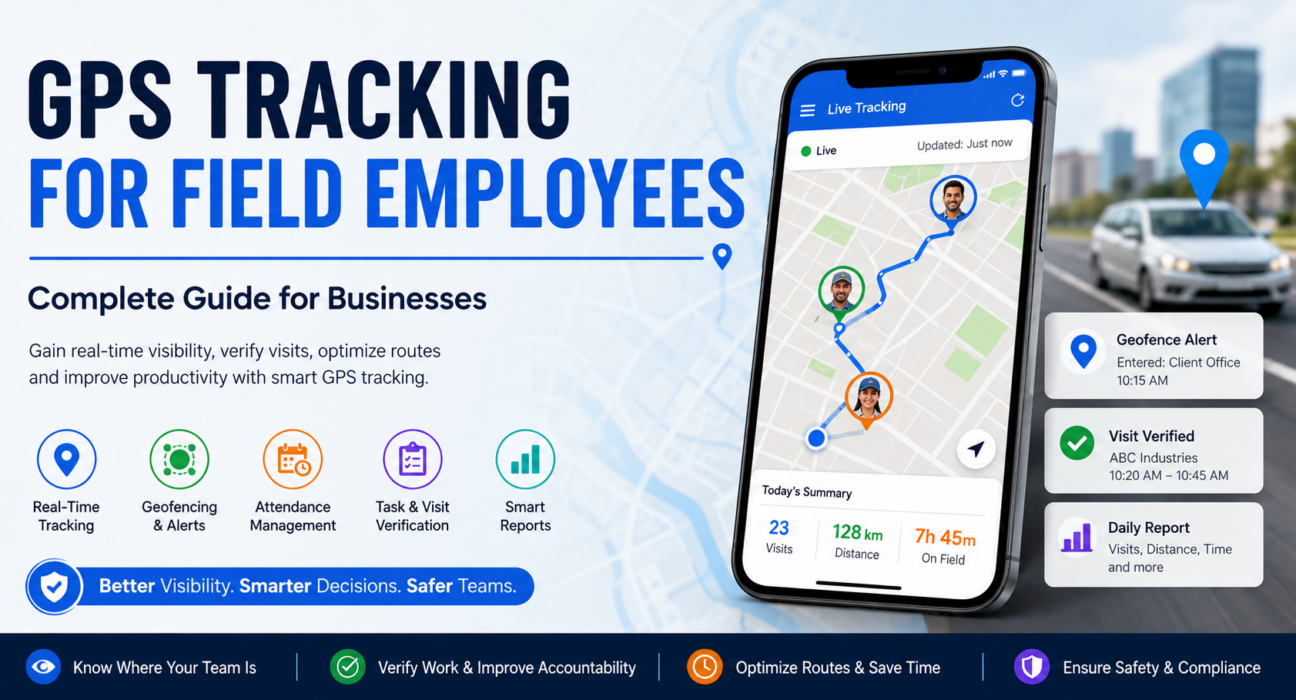
At its core, it’s location-tracking technology — usually a mobile app on the employee’s phone — that shows a business where its field staff are, how they’re moving between locations, and where they’ve been over the course of a shift.
It’s worth separating this from vehicle GPS tracking, which is tied to a car, not a person. Employee-level tracking follows the individual, which matters a lot for field sales reps, technicians, and delivery staff who might switch between a bike, a car, and just walking between stops in a single day.
How It Actually Works
- The employee opens the app. Usually the same app they already use for attendance or task updates, so there’s no extra login to remember.
- Location gets captured periodically. Not constantly — good systems check in at intervals rather than draining the battery with continuous GPS pings.
- That data goes to a dashboard. Managers and admins see it centrally, not scattered across phone calls and WhatsApp updates.
- The map shows what’s happening. Live positions, where someone’s been, and how long they stayed at each stop.
- It all rolls up into reports. Distance covered, time in the field, number of visits — the numbers that actually tell you something.
Why Businesses Bother With It
Here’s the honest reason most companies adopt this: field teams are hard to manage precisely because you can’t see them. A rep says they hit five accounts today. A technician says a job took three hours. Without location and time data, you’re taking their word for it — which isn’t a knock on your team, it’s just an impossible position to manage from.
A few problems this tends to fix:
- You genuinely can’t see where people are during the day, so every check-in is a guess.
- Visits go unverified. Did the rep actually stop at that client, or just log it?
- Routes end up wasteful because nobody has the data to spot the pattern.
- Attendance gets messy when your team isn’t clocking in from one physical office.
- It’s hard to tell time traveled from time working, which makes productivity numbers fuzzy.
- Safety is a real concern for people working alone in unfamiliar areas — knowing where someone is isn’t just about oversight.
What You Actually Get Out of It
| Benefit | What It Means Day to Day |
|---|---|
| Real-time visibility | You know where the team is without calling to ask |
| Verified visits | Location data backs up (or contradicts) what got logged |
| Smarter routing | Travel patterns show you where time is being wasted |
| Cleaner attendance | Check-ins tie to an actual location, not a manual entry |
| More consistency | Teams tend to stick to plans when tracking is transparent |
| Better decisions | Reporting turns raw movement into something you can act on |
What to Actually Look For in GPS Tracking Software
Plenty of tools claim to do this. Fewer do it well for field teams specifically. Here’s what actually matters.
Real-Time Tracking, Not Just History
Seeing where someone was an hour ago is fine for reports. Seeing where they are right now is what lets you reassign a job or redirect someone on short notice.
Geofencing
This lets you draw a virtual boundary around a client site or service zone, so the system logs entry and exit automatically — or fires an alert if someone shows up somewhere they shouldn’t. It’s one of the more useful features for verifying visits without asking employees to manually check in every time.
Route History You Can Actually Replay
Being able to see the exact path someone traveled, not just the start and end points, is what turns “this route feels inefficient” into a data-backed decision.
Attendance Tied to Location
Manual attendance falls apart fast with a distributed team. Linking check-in and check-out to GPS makes it far harder to fudge, and far easier to trust.
Visit and Task Verification
The location data means little on its own — pairing it with task logs or visit records is what actually confirms work got done, and where.
Reporting That Tells You Something
Distance covered, time per stop, idle periods — the point isn’t the raw data, it’s spotting the pattern that’s costing you time or money.
Tracking That Doesn’t Wreck the Phone
If the app kills battery life by mid-afternoon or tracks people after they’ve clocked out, you’ll get pushback fast — and rightly so.
Is It Even Legal to Track Employees This Way?
Fair question, and usually the first one that comes up. The short answer: yes, in most places, as long as you’re doing it reasonably. That generally means:
- Tracking only during work hours, not around the clock.
- Telling employees upfront, ideally in writing.
- Having a legitimate reason — safety, service verification, productivity — not just monitoring for its own sake.
- Getting proper consent if employees are using personal phones rather than company-issued devices.
Exact rules differ by country and state, and some regions (GDPR territory in the EU, certain US states) have specific consent and data-handling requirements. This isn’t a substitute for legal advice — if you’re rolling out tracking at scale, it’s worth having a lawyer sanity-check your policy first. [Internal Link Opportunity: Relevant FieldExecutives blog on employee tracking policy or compliance, if available]
Rolling It Out Without Creating a Trust Problem
The technology is the easy part. How you introduce it is what determines whether your team accepts it or resents it.
- Put the policy in writing. What’s tracked, when, and why — spelled out, not implied.
- Explain the reason, honestly. “This helps us verify visits and plan better routes” lands very differently than silence followed by a surprise announcement.
- Track work hours only. Nobody wants to feel monitored after they’ve clocked out, and it’s unnecessary anyway.
- Use the data to fix things, not to punish. If a route’s inefficient, fix the route. Save discipline for actual, repeated issues.
- Combine it with other field data. GPS alone is just dots on a map — paired with attendance and task completion, it becomes a real picture of performance.
- Pick software with real privacy controls. Configurable tracking hours and clear data-retention rules matter more than people expect.
- Revisit it periodically. If the reports keep showing the same idle time or the same inefficient route, that’s your cue to adjust territory or planning — not just note it and move on.
It Looks a Bit Different Depending on the Team
Field Sales
For reps, it’s mostly about verifying visits actually happened and understanding territory coverage — which accounts are getting attention and which aren’t. [Internal Link Opportunity: FieldExecutives Field Sales Management page]
Field Service
For technicians, it’s arrival times, SLA compliance, and being able to dispatch whoever’s actually closest to a new job — not just whoever’s next on a list. [Internal Link Opportunity: FieldExecutives Field Service Management page]
Delivery and Logistics
Here it’s mostly about giving customers accurate delivery windows and having a real answer when someone disputes a delivery time.
Where Field Force Management Software Comes In
A basic GPS app will show you dots on a map. What it usually won’t do is connect that to attendance, tasks, customer visits, or expenses — which is where most of the actual business value sits.
This is the gap field force management platforms like FieldExecutives are built to close — combining real-time GPS tracking with attendance, geofencing, task management, and reporting in one place, instead of juggling separate tools that don’t talk to each other. [Internal Link Opportunity: FieldExecutives GPS Tracking feature page]
For businesses with a large or spread-out field team, this matters more than it sounds. Manually cross-checking location data against attendance sheets and visit logs isn’t just tedious — it’s the kind of thing that quietly eats a manager’s whole week. [Internal Link Opportunity: FieldExecutives Pricing page]
A Quick Checklist Before You Choose
Worth running through before committing to a tool:
- Is the tracking actually real-time, or just periodic updates dressed up as live?
- Does it support geofencing for client sites or service zones?
- Does it connect location data to attendance and task management, or live in its own silo?
- Is the reporting genuinely useful, or just a data dump?
- Can you configure tracking hours so employees aren’t tracked off the clock?
- Will your field team actually find it easy to use?
- Does the vendor help with onboarding, or leave you to figure it out?
If you want to see how these pieces work together in practice, it’s worth [Internal Link Opportunity: FieldExecutives Book a Demo / Contact page] rather than trying to evaluate it from a features list alone.
Conclusion
GPS tracking for field employees fixes a problem most field-heavy businesses have lived with for years: not knowing what’s actually happening once the team leaves the office. Done right, it verifies visits, tightens up routing, and makes attendance data something you can actually trust. Done badly — with no policy, no communication, and tracking that never turns off — it just breeds resentment.
The technology matters less than how you use it. Field force management platforms like FieldExecutives pair GPS tracking with attendance, tasks, and reporting so you’re working from one clear picture instead of piecing it together from five different tools. If your field operations still run on phone calls and guesswork, this is usually the first thing worth fixing.