Telecalling CRM With Call Recording and Performance Analytics: What to Look For
When a customer says “your agent promised me a discount,” how do you check? Without recordings, managers rely on memory and guesswork. A telecalling CRM with call recording keeps each call on the lead’s record, so disputes, coaching and quality checks start from what was actually said.
This guide explains what call recording does inside a CRM, how it connects to performance analytics, which features to check before buying, and what Indian businesses should know about consent and data protection. It is written for sales managers, business owners and compliance-minded teams in India.
What Is a Telecalling CRM With Call Recording?
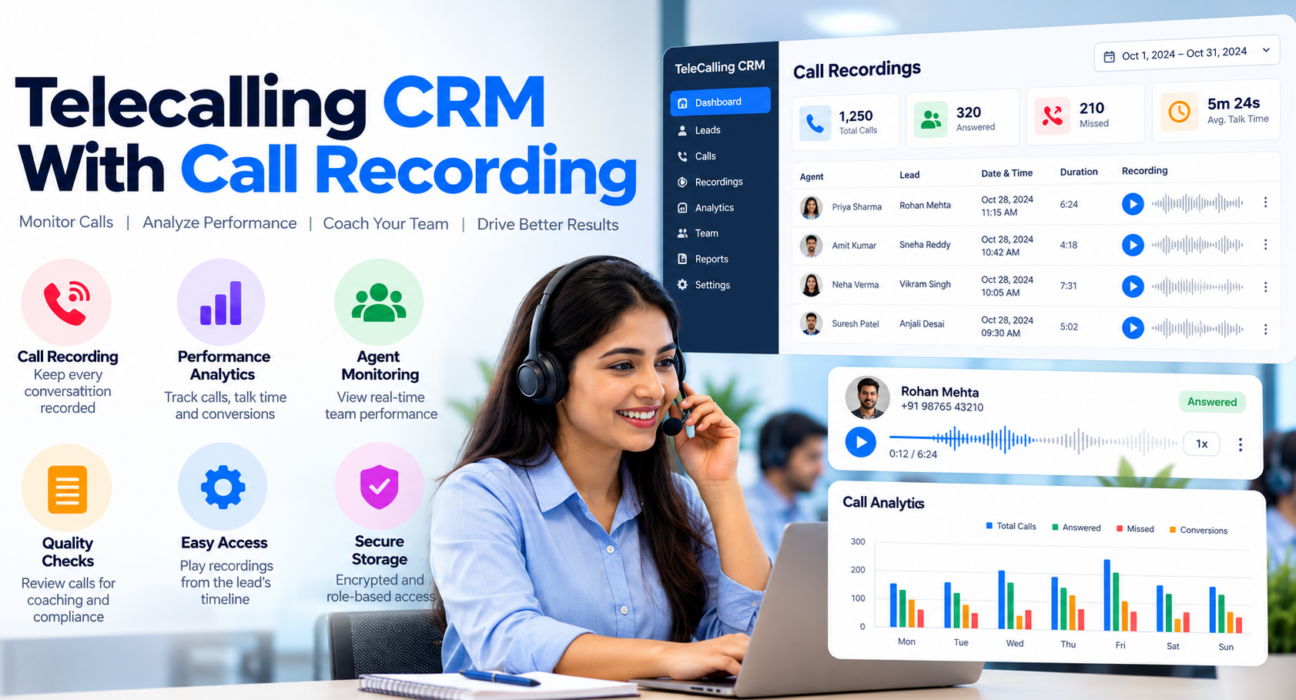
A telecalling CRM with call recording is software that records outbound sales calls and stores each one on the matching lead’s timeline, next to notes, outcomes and follow-ups. Managers can then replay calls for coaching or dispute checks. Analytics add the numbers, such as connection rate, talk time and conversions, so you can see both what happened and why.
A standalone recorder only saves audio files. In contrast, a CRM links each recording to a lead, an agent and an outcome, which makes the recordings easier to find and use.
Why Call Recording Matters for Telecalling Teams
Recording is not only about catching mistakes. Instead, when used well, it supports several everyday needs:
- Dispute resolution. A recording settles questions about pricing, offers or promises quickly.
- Coaching. Managers can pick real calls to review with an agent instead of relying on summaries.
- Handovers. When a lead moves to another agent, the new agent can hear the earlier conversation.
- Onboarding. New telecallers learn faster from good calls than from a script alone.
- Compliance review. In regulated areas such as insurance and finance, recordings help show what was communicated.
However, none of this works if recordings are scattered across phones. Centralised storage with proper access control is what turns audio into a management tool.
Features to Look For
However, not every recording feature matters equally. Use this table as a buying checklist:
| Feature | Why it matters | Question to ask the vendor |
|---|---|---|
| Recording linked to the lead | Saves time searching for calls | Can I play a call from the lead’s timeline? |
| Encrypted storage | Recordings contain personal data | Are recordings encrypted at rest and in transit? |
| Role-based access | Agents should not hear everyone’s calls | Who can hear which calls? |
| Retention controls | Keeping audio forever adds risk | Can I auto-delete recordings after a set period? |
| Erasure option | Customers may ask for data deletion | Can I remove a lead and all its files? |
| Call outcome and duration logging | Gives context to each recording | Are these captured automatically? |
| Analytics and reports | Shows trends beyond single calls | Can I filter by agent, date and lead source? |
| Mobile support | Many telecallers work from phones | How are recordings captured on my agents’ devices? |
The last question deserves special attention. How a recording is captured on a phone can vary by product and device, so test it on the handsets your team actually uses.
From Recording to Performance Analytics
Recordings show individual conversations, whereas analytics show patterns. Together, they answer different questions.
Analytics tell you where to look. For instance, a dashboard may show that one agent has long talk times but few conversions. Likewise, a source report may show that leads from one channel rarely connect.
Recordings, in turn, tell you why. After spotting a pattern, you can listen to a few calls and find the cause, such as a missing question or a weak closing line.
Useful metrics to track together include:
- Connection rate and answer rate, to judge lead quality and calling times
- Talk time, to compare depth of conversations
- Call outcomes and the conversion funnel, to see where leads drop off
- Source performance, to know which channels bring better leads
- Agent comparison and leaderboards, to find coaching needs and good practices
Still, any single metric can mislead. As a rule, read at least two together before drawing conclusions.
Where AI Call Analysis Fits
Some platforms now analyse recordings automatically. According to the TeleCallingCRM features page, its optional AI call analysis transcribes calls (including Hindi and Hinglish), writes a short summary, detects sentiment, extracts key points and action items, and gives a quality score with coaching notes.
This can save review time, especially when a team makes hundreds of calls a day. Even so, treat AI output as a filter, not a judge. A low score tells you which call to listen to, but only a person can judge tone, context and customer needs. Also check how the vendor stores transcripts, because they are personal data too.
How to Run a Simple Call Review Process
Even so, recordings are useful only when someone listens to them. Here is a light routine that most teams can sustain:
- Pick a sample. Choose a few calls per agent each week, mixing good, average and unconverted calls.
- Use a short checklist. Check the opening, discovery questions, handling of objections, next-step agreement and logging quality.
- Review with the agent. Play one strong moment and one improvement area, and then agree on a single focus for the week.
- Track the change. Then compare the same agent’s conversion and follow-up numbers over the next few weeks.
- Share good calls. If the agent agrees, use strong calls as training examples for the team.
Call Recording and Compliance in India
Because recordings contain voices and often details about money, health or insurance, they count as personal data. Compliance guides, such as Exotel’s overview of call recording compliance in India, point to the Digital Personal Data Protection (DPDP) Act, 2023 as the main framework. They highlight a few practical points:
- Tell people. Announce at the start of the call that it is being recorded and explain why.
- Get clear consent. Consent is expected to be informed and given through a clear action, and simply staying on the line is generally not considered enough.
- Limit the purpose. Use recordings only for the purpose you stated, such as quality and training.
- Do not keep them forever. Set retention periods and delete recordings once the purpose is served.
- Respect customer rights. Be ready to handle requests to access, correct or delete data.
As for timing, one legal briefing reports that the DPDP Rules were notified in November 2025, with most operational duties, including notice, consent and retention, due to apply from 13 May 2027 (see this summary of the DPDP Rules timeline). Rules and timelines can change, so confirm the current position with a qualified advisor.
Separately, TRAI’s rules on commercial calls, such as DND checks and calling hours, still apply to whether you may place the call at all. This article is general information, not legal advice.
Example: A Hypothetical Insurance Renewal Team
This is a hypothetical example to show how the pieces fit together.
An agency runs a team of six agents calling customers about policy renewals. Each call starts with a recording notice, and the CRM stores the audio on the customer’s record. As a result, when a customer later disputes the premium quoted, the manager plays the call and resolves the matter in minutes.
During weekly reviews, the manager notices that one agent’s renewal conversion is lower than the team’s. After listening to a few calls, the manager finds that the agent skips the benefits recap. A short coaching session follows, and the next month’s report shows whether the change helped. For more on this sector, read our post on what insurance teams gain with a tele calling CRM.
Common Mistakes to Avoid
- Recording calls without telling customers or documenting consent.
- Keeping every recording indefinitely.
- Giving all staff access to all recordings.
- Reviewing calls only after a complaint.
- Trusting AI scores without listening to the calls.
- Judging agents on one metric, such as talk time or call count.
- Skipping a trial on the devices and network your team really uses.
Limitations to Keep in Mind
Still, recording does not fix a weak script or a poor lead list. Moreover, reviewing calls takes manager time, and a team that never reviews them gains little from the feature. Storage and privacy duties also grow with the number of recordings.
In addition, agents may feel uneasy about being recorded. For this reason, explain the purpose openly and use recordings for coaching first, not punishment.
How TeleCallingCRM Can Help
TeleCallingCRM is built for outbound sales and telecalling teams in India. According to its website, every call can be recorded, stored encrypted and played back from the lead’s timeline. Agents hear only their own calls, while admins can hear the whole team’s.
The platform also lists configurable retention with automatic deletion of recordings and closed leads, as well as a right-to-erasure option that removes a lead with its data and files. On the analytics side, it lists a live dashboard, connection and answer rates, a custom report builder, a conversion funnel, source performance, agent comparison and CSV, Excel or PDF export. Optional AI call analysis is available as described above.
If you are still comparing tools, our guide on how to choose the best telecalling CRM for your business covers the wider checklist. Plans start at ₹999 per month (excluding GST) with a 3-day free trial, as listed on the pricing page, so please confirm current details before deciding.
Frequently Asked Questions
What is a telecalling CRM with call recording?
It is a CRM that records sales calls and stores each recording on the lead’s record along with notes, outcomes and follow-ups. Managers can replay calls for coaching and disputes, while analytics show performance trends across agents and lead sources.
Is call recording legal in India?
Recording is common, but it must respect data protection and consent expectations. Compliance guides point to the DPDP Act, 2023, which calls for clear notice and consent, a stated purpose and limited retention. Check the current rules with a qualified advisor.
Do I need to tell customers that a call is recorded?
Yes, as a good practice and under the consent expectations described above. Announce the recording and its purpose at the start of the call, and also keep a record of how consent was given.
How long should call recordings be kept?
There is no single answer. Instead, keep them only as long as their purpose requires, such as quality review or dispute handling, and set an automatic deletion period. Some industries have their own record-keeping rules, so check yours.
Can managers use recordings to coach telecallers?
Yes, and this is one of the most useful applications. Pick a small sample of calls each week, review them against a short checklist and then agree on one improvement focus with the agent.
What performance analytics should a telecalling CRM provide?
Look for connection rate, answer rate, talk time, call outcomes, a conversion funnel, source performance and agent comparison. Date filters and export options also help with review meetings.
Is AI call analysis reliable enough to replace manual review?
No. AI can transcribe, summarise and flag calls, which saves time. However, it can miss tone and context, so managers should still listen to key calls and use scores as a guide only.
Conclusion
A telecalling CRM with call recording gives managers evidence, gives agents better coaching and gives the business a clearer record of customer conversations. It works best when recordings are linked to analytics, reviewed on a regular schedule and handled with clear consent and retention rules.
To begin, make a short list of must-have features and test them with your own agents and devices. Later, when you are ready to see recording and reports in action, you can book a demo of the telecaller CRM and check each point on the table above.