Introduction
Collecting rent on time sounds simple until you’re managing 40 tenants across multiple floors, each paying on different dates, through different methods, with different due amounts because of partial payments or late fees. This is the reality for most PG and hostel owners, and it’s exactly why PG rent management becomes one of the most operationally demanding parts of running a paying guest business.
Poor rent tracking leads to missed payments, disputed deposits, confusing spreadsheets, and constant follow-up calls. This article breaks down how to track rent payments, security deposits, and outstanding dues in a structured way, so you spend less time chasing tenants and more time running your property. Many owners eventually move from manual tracking to a dedicated PGCRM platform to keep this process organised as their property grows.
What Is PG Rent Management?
PG rent management is the process of tracking, collecting, and recording rent payments, security deposits, and outstanding dues from tenants living in a paying guest or hostel facility. It covers everything from setting rent schedules and recording payments to sending reminders and reconciling what’s paid versus what’s owed.
For a small PG with 10-15 beds, you can manage this with a notebook or spreadsheet. But as occupancy grows, or if you manage multiple properties, manual tracking quickly becomes error-prone and time-consuming.
Why Rent Tracking Is Harder Than It Looks
A few factors make PG rent collection more complex than a typical single-tenant rental:
- High tenant turnover – PG tenants often stay for a few months, not years, so rent records need constant updating.
- Mixed payment methods – Cash, UPI, bank transfers, and cheques are all common, often within the same property.
- Variable due dates – Tenants may join mid-month, creating prorated rent amounts that are easy to miscalculate.
- Multiple beds per room – Shared rooms mean tracking rent per bed, not just per room.
- Deposits and refunds – Security deposits need separate tracking from monthly rent, especially at move-out time.
Setting Up a Reliable PG Rent Management System
Before looking at tools, get the fundamentals right. A good rent tracking system, whether on paper or digital, should capture the following for every tenant:
- Tenant name and contact details
- Room and bed number
- Monthly rent amount
- Due date
- Security deposit amount and status
- Payment history (dates, amounts, method)
- Outstanding dues, if any
- Move-in and expected move-out date
Manual Tracking vs Software-Based Tracking
| Aspect | Manual Tracking (Registers/Excel) | Software-Based Tracking |
|---|---|---|
| Payment recording | Manual entry, prone to errors | Recorded against tenant profile automatically |
| Due date reminders | Owner must remember and follow up | Automated rent reminders |
| Multiple properties | Difficult to consolidate | Centralized view across properties |
| Deposit tracking | Often mixed with rent records | Tracked separately from rent |
| Reports | Manually compiled, time-consuming | Generated instantly |
| Error risk | Higher, especially with partial payments | Lower, with structured records |
Both approaches can work for very small properties, but as the number of tenants grows, the manual method becomes harder to sustain without dedicated staff time.
How to Track Rent Payments Effectively
1. Maintain a Tenant-Wise Payment Ledger
Every tenant should have an individual record showing their rent amount, due date, and payment history. This makes it easy to answer a common question instantly: has this tenant paid this month or not?
If you’re using a spreadsheet, keep one row per tenant per month, with columns for amount due, amount paid, payment date, and method. If you’re using a PG management system, this ledger is usually generated automatically as payments are recorded.
2. Record Payments the Same Day They’re Received
Delayed entry is one of the biggest causes of rent tracking errors. If a tenant pays in cash on the 3rd but it isn’t logged until the 10th, it creates confusion about who has actually paid. Make it a habit, or a rule for staff, to record every payment on the day it’s received.
3. Track Payment Method Alongside the Amount
Because PG rent often comes through a mix of cash and UPI, note the payment method for every entry. This helps with reconciliation later, especially when verifying cash collections against bank deposits.
4. Send Rent Reminders Before the Due Date
A short reminder a few days before rent is due reduces late payments significantly. This can be a manual WhatsApp message, an SMS, or an automated reminder if you’re using rent management software. Automated rent reminders remove the need for owners to manually track and message each tenant individually.
5. Flag Partial Payments Clearly
When a tenant pays part of the rent, don’t just note the amount; note what’s still outstanding. A payment of ₹5,000 against a ₹8,000 rent should immediately show a ₹3,000 due balance, not just a payment entry that looks complete at a glance.
Managing Security Deposits Correctly
Security deposits form a separate financial category from rent, so never track them in the same column. <!– INTERNAL LINK: link to a related post, e.g. “PG tenant onboarding” or “KYC management for PG owners” –> Deposits are typically:
- Collected once, at the start of a tenancy
- Held for the duration of the stay
- Refundable, minus any deductions for damages or unpaid dues
- Returned (fully or partially) when the tenant moves out
Common Deposit Management Mistakes
- Mixing deposit amounts into monthly rent records, making it unclear how much is actually refundable.
- Not documenting deductions (repairs, unpaid utility charges) before refunding a deposit, leading to disputes.
- Failing to record the deposit at all for short-stay tenants, creating confusion at move-out.
A simple fix is to maintain deposit records separately, tagged to each tenant profile, with a clear status: held, partially deducted, or refunded. This is one area where a centralised system helps significantly, since deposits are easy to lose track of in a general ledger, especially across multiple properties.
Tracking and Reducing Outstanding Dues
Outstanding dues, tenants who haven’t paid on time, are one of the most common operational headaches in PG and hostel management. Here’s a structured approach to managing them.
Step-by-Step Process for Handling Dues
- Identify overdue accounts weekly, not just at month-end. Waiting too long makes recovery harder.
- Categorise dues by age — recently overdue (0-7 days) versus long overdue (30+ days) require different approaches.
- Send a polite reminder first, before any escalation. Many delays are due to forgetfulness, not unwillingness.
- Document every follow-up, including dates and responses, in case further action is needed.
- Set a clear late payment policy and communicate it to tenants at move-in, so expectations are clear from day one.
Why Centralised Dues Tracking Matters
When dues sit scattered across multiple registers, chat messages, or memories, tenants can easily slip through unnoticed for weeks. A centralised system, whether a well-maintained spreadsheet or dedicated software, gives you a single view of who owes what, updated in real time. This is particularly useful for owners managing multiple PGs, where dues across properties can otherwise become impossible to track manually.
How PG Management Software Simplifies Rent Tracking
As a property grows past a handful of tenants, most owners look for a more structured way to manage rent, deposits, and dues without relying entirely on manual effort. This is where PG management software becomes useful.
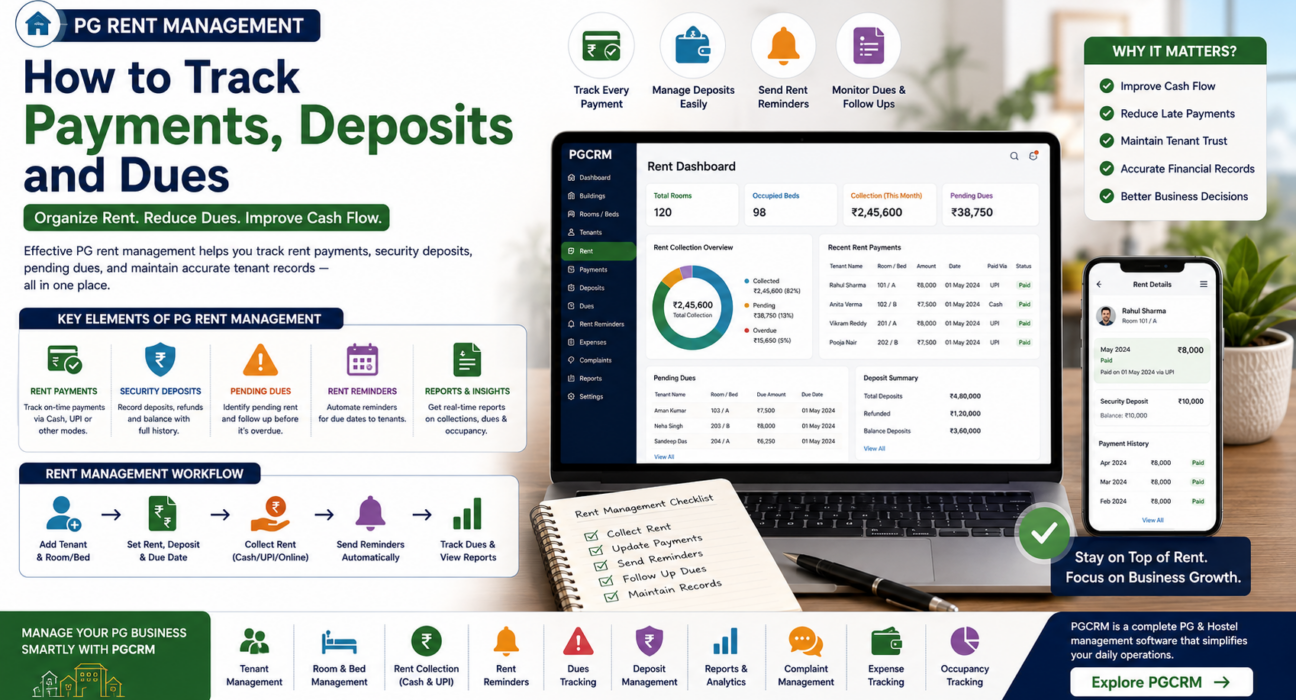
Platforms such as PGCRM focus specifically on PG and hostel operations and typically help owners handle day-to-day PG rent management tasks such as the following:
- Maintain centralised tenant and room/bed records
- Track rent payments against each tenant automatically
- Record cash and UPI payments in one place
- Send rent reminders to reduce late payments
- Maintain KYC and tenant documentation alongside rent records
- Track occupancy and vacancy across rooms and beds
- Generate reports on rent collected and dues outstanding
Using PG management software such as PGCRM allows owners to see, at a glance, who has paid, who hasn’t, and what deposits are pending refund without manually cross-checking multiple records. For owners managing more than one property, this centralised visibility becomes especially valuable, since it removes the need to reconcile separate registers for each PG.
Best Practices for Long-Term PG Rent Management
- Standardise your due dates where possible, so reminders and reconciliation follow a predictable monthly cycle.
- Digitise records early, even before you feel you “need” software, since migrating years of paper records later is far more work.
- Separate rent, deposits, and other charges (electricity, maintenance) into distinct categories rather than one combined figure.
- Review dues weekly, not just monthly, to catch issues early.
- Keep tenant contact details updated, since outdated numbers make reminders and follow-ups ineffective.
- Maintain a written late-payment policy so enforcement is consistent and doesn’t feel arbitrary to tenants.
Frequently Asked Questions
What is the best way to handle PG rent management for payments?
The best approach is a tenant-wise ledger that records rent amount, due date, payment date, method, and any outstanding balance. For small properties, a well-maintained spreadsheet works; for larger or multiple properties, PG rent management software automates this tracking and reduces manual errors.
How should you track security deposits separately from rent?
Record deposits in a separate field or column from monthly rent, and tag each one with a status: held, deducted, or refunded. This prevents confusion between recurring rent income and one-time refundable amounts, which is a common source of disputes at move-out.
How can PG owners reduce late rent payments?
Send reminders a few days before the due date, communicate a late payment policy clearly at move-in, and review dues weekly instead of monthly. Automated reminders, where available, further cut down on missed payments caused by forgetfulness.
Should PG rent be tracked per room or per bed?
In shared rooms, track rent per bed, not just per room, since each occupant may have joined on a different date or agreed to a different rate. Per-bed tracking avoids confusion when tenants in the same room have different payment schedules.
What should happen to a security deposit when a tenant moves out?
Review the deposit against any pending dues or damages before refunding it. Document any deductions, communicate them clearly to the tenant, and refund the remaining amount within a reasonable, agreed timeframe.
Is spreadsheet-based rent tracking enough for a small PG?
For a small property with a handful of tenants, a well-organised spreadsheet can work. However, as tenant turnover increases or the owner manages multiple properties, spreadsheets become harder to maintain accurately, which is when dedicated PG rent management software becomes more practical.
How does PG management software help with outstanding dues?
It centralises tenant payment records so overdue accounts stay visible at a glance, rather than requiring manual cross-checking across registers. This makes it easier to follow up promptly and lowers the chance that dues go unnoticed for extended periods.
Conclusion
Effective PG rent management comes down to consistency: recording payments promptly, keeping deposits separate from rent, and reviewing dues regularly instead of letting them pile up. Whether you’re managing five beds or fifty, a clear, centralised system, digital or otherwise, is what prevents small tracking errors from becoming larger financial and trust issues with tenants.
As your property or portfolio grows, tools built specifically for this purpose can save significant time. Explore PGCRM to simplify your PG and hostel management, from rent tracking and deposits to reminders and reporting, all in one place.