Field Force Automation: How to Digitize Your Field Operations
If your field team’s day still runs on WhatsApp messages, paper attendance, and end-of-month expense spreadsheets, you are managing your business partly in the dark. Field force automation replaces those manual steps with a connected system. Every visit, punch-in, task, and payment becomes a record you can see and act on.
This guide explains what field force automation is, what to automate first, and how to roll it out without disrupting your team. It also covers what to look for in software.
What Is Field Force Automation?
Field force automation is the use of mobile and cloud software to manage, track, and support employees who work outside the office. It automates tasks such as attendance, visit scheduling, task assignment, route planning, reporting, and expense approval. Managers get real-time visibility without chasing updates by phone.
It is closely related to field force management and field workforce management. The terms overlap, but the emphasis differs:
- Field force management is the broader discipline of planning, supervising, and improving field teams.
- Field force automation is the technology layer that removes manual work from that discipline.
Typical users include sales teams, service technicians, delivery staff, collection agents, merchandisers, and surveyors.
Why Manual Field Operations Break Down
Manual processes work for a team of three. They stop working when you have thirty people across several cities. The usual problems are:
- No live visibility. Once the team leaves the office, you rely on what people tell you.
- Unverified visits. Without location or photo proof, “I visited the customer” cannot be checked.
- Admin overload. Reps spend hours on daily reports, and managers spend more hours consolidating them.
- Slow money cycles. Paper receipts and spreadsheets delay expense reimbursement and make collections hard to reconcile.
- Poor planning. Routes are decided by habit, so travel time is longer than it needs to be.
- Little usable data. Without clean records, you cannot coach reps, compare territories, or measure what works.
Automation targets each of these gaps directly.
What Can You Automate in Field Operations?
Most businesses do not need to automate everything at once. The table below shows common manual tasks and what replaces them.
| Field activity | Manual method | Automated approach |
|---|---|---|
| Attendance | Paper registers, phone calls | Mobile punch-in with GPS and geofencing |
| Team location | Calling or messaging reps | Live map and location trail |
| Task assignment | Calls, messages | In-app tasks with checklists and deadlines |
| Visit proof | Verbal confirmation | Photo, signature, or OTP capture |
| Route planning | Rep’s own judgment | Route and beat-plan optimization |
| Expenses | Paper bills, spreadsheets | Receipt-backed claims with approval workflow |
| Collections | Manual receipts | Tracked collections through to settlement |
| Reporting | End-of-day messages | Real-time dashboards and KPIs |
Attendance and Location Tracking
Attendance is usually the first process teams digitize because the benefits are immediate. A mobile punch-in captures time and location. Geofencing confirms the rep is at the expected site. Server-side timestamps stop people from changing their phone clock.
Location tracking should apply only to on-duty staff who have given consent. Tell your team what is tracked and why. This matters for trust and for privacy expectations.
Task and Visit Management
A manager creates a task or visit with a priority, a checklist, and a deadline. The right person receives it on their phone. When the visit is complete, the rep records the outcome, so nothing depends on memory or a late-night message.
For service teams, this is also where SLA management comes in. Timers and escalation rules show which jobs are at risk before a deadline is missed.
Route and Beat Planning
Route planning is one of the clearest places to save time. Beat planning assigns reps to a fixed set of outlets or customers on a schedule. Optimized sequencing reduces backtracking and dead time between stops. Even modest reductions in daily travel add up across a team over a month.
Expense and Collection Management
Field employees pay for fuel, meals, and travel, and often collect payments from customers. Automating this means photo receipts, a defined approval chain, and a full record of every collection. It shortens reimbursement cycles and makes reconciliation far less painful.
Reporting and Analytics
Once data is captured digitally, reports are generated automatically. Useful metrics include visits completed against plan, attendance rates, task turnaround time, SLA compliance, and expense trends.
How to Digitize Your Field Operations: 6 Steps
- Map your current process. Write down what your team does from start of day to end of day, and note every manual handoff.
- List your biggest problems. Rank them, for example fake attendance, missed visits, slow expense approval, or no route discipline.
- Define what you want to measure. Choose a few KPIs, such as visits per day, on-time completion, or claim turnaround.
- Choose software that fits your workflow. Look for configurable forms, workflows, and roles instead of a rigid template.
- Pilot with one team. Start with a single region or department, gather feedback, and adjust the setup.
- Roll out and review. Train the wider team, then review the data weekly during the first month.
Adoption matters more than features. If the mobile app is slow or confusing, reps will work around it. Keep the daily workflow short and simple.
Benefits of Field Force Automation
- Visibility: You see who is where, what is done, and what is pending.
- Accountability: Photo, signature, and OTP proof make outcomes verifiable.
- Productivity: Less time on admin and travel leaves more time with customers.
- Cost control: Structured expense and collection workflows reduce leakage.
- Better decisions: Consistent data lets you compare reps, routes, and territories fairly.
- Scalability: Adding new team members or cities does not add proportionate manual work.
Results vary by business, team size, and how well the system is adopted, so treat any promised percentage improvement with caution.
What to Look for in Field Force Automation Software
Use this checklist when comparing tools:
- Offline-first mobile app. Network coverage is uneven in many field locations, so the app should work without signal and sync later.
- Tamper-resistant attendance. Look for geofencing, server-time punch-in, and mock-location detection.
- Proof capture. Photos, signatures, and OTP confirmation should be built in.
- Configurable workflows. You should be able to set your own job types, forms, approvals, and SLAs.
- Route and beat planning. Planning should be part of the platform, not a separate tool.
- Expense and collection tracking. Money workflows should sit alongside visits and tasks.
- Role-based access. Reps, managers, and owners should each see what they need.
- Integrations. Check that the tool can connect with your CRM, ERP, accounting, or HR systems.
- Transparent pricing. Understand how per-user pricing scales as your team grows.
- Data privacy. Ask how location data is handled and who can see it.
How FieldExecutives Supports Field Force Automation
Businesses that want to replace spreadsheets and messaging groups can use field force management software such as FieldExecutives. It is built around a daily field workflow, from clock-in to check-out.
Based on the FieldExecutives website, the platform includes:
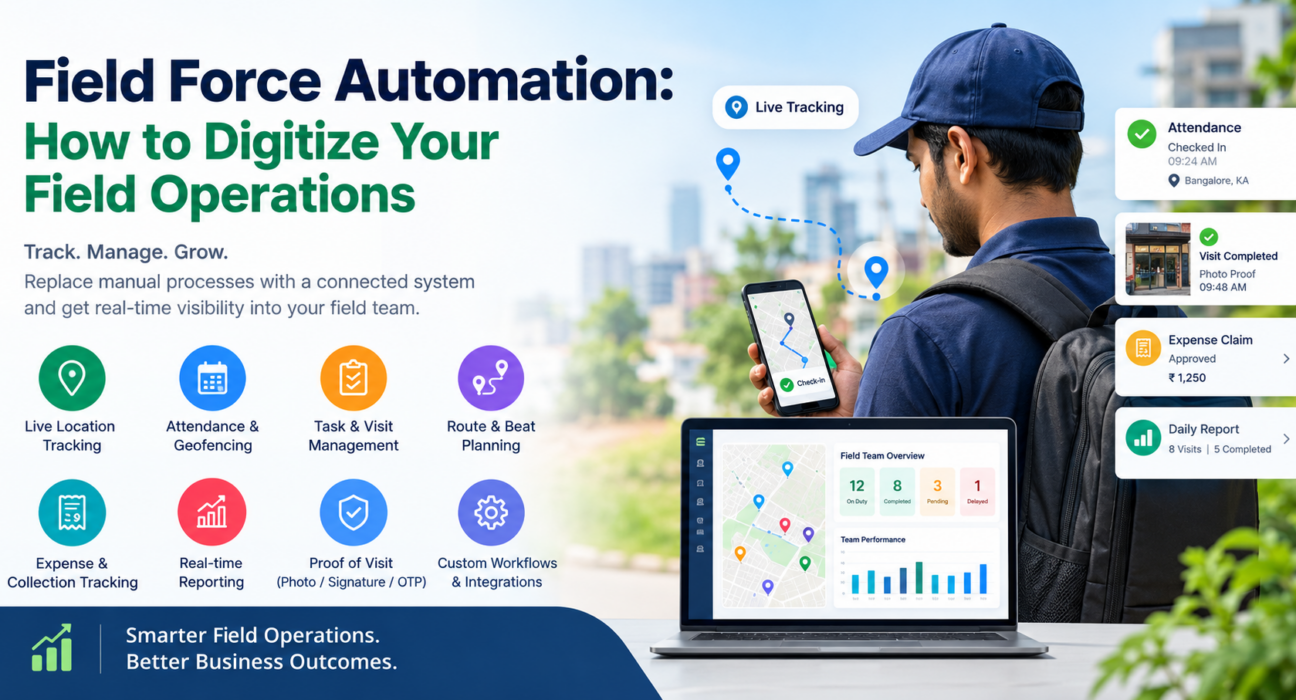
- Live map and GPS tracking of on-duty team members, with a location trail.
- Geofenced attendance with server-time punch-in and spoof detection.
- Task and visit management with checklists and SLA timers.
- Proof of visit through photo, signature, and OTP capture.
- AI-assisted route and beat-plan optimization.
- Expense claims with receipts and an approval workflow, plus collection tracking.
- Custom forms and workflows that can be configured without code.
- An offline-first mobile app for Android and iOS, a web console for managers, and an admin portal for owners.
It is used across areas such as FMCG and distribution, field service and repair, logistics, and banking and collections. You can review the full feature list or check pricing.
The FieldExecutives site notes that savings figures are illustrative and not guaranteed. Your own results will depend on your team, your processes, and adoption.
Common Mistakes to Avoid
- Automating a broken process. Fix confusing steps first, or you will digitize the confusion.
- Skipping team communication. Explain what is tracked and how it helps reps too, such as faster reimbursements.
- Tracking too much. Collect the data you will act on, not everything the tool can capture.
- Ignoring the pilot. A small rollout exposes problems while they are cheap to fix.
- Never reviewing the data. Dashboards only help if managers use them in regular reviews and coaching.
Conclusion
Field force automation gives you what manual methods cannot: live visibility, verified visits, faster money cycles, and data you can act on. The practical path is to map your current process, fix the biggest gaps first, pilot with one team, and expand once the workflow is stable.
If you are ready to move off spreadsheets and messaging groups, FieldExecutives offers a way to manage attendance, visits, routes, expenses, and reporting on one platform. Explore the features or book a demo to see how it fits your field operations.