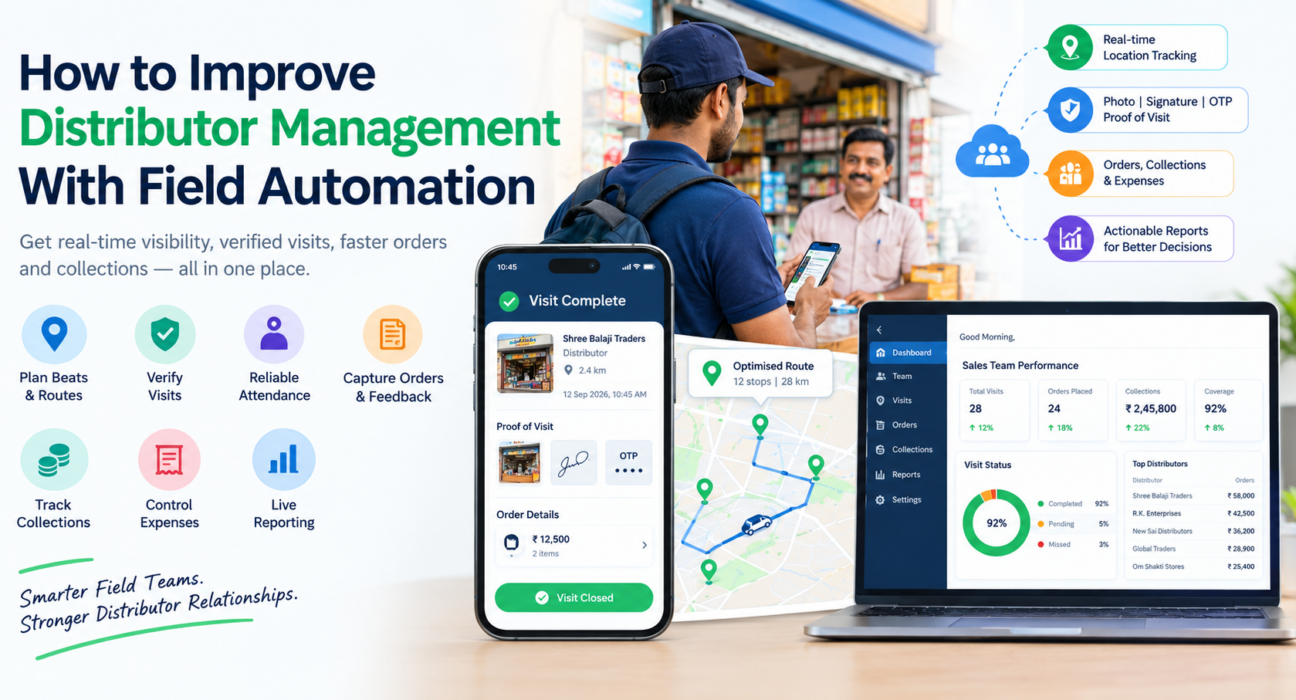
How to Improve Distributor Management With Field Automation
If you manage dozens or hundreds of distributors, you already know the problem. Orders arrive late, visits are reported but not verified, and payments are chased by phone. Your team’s real activity is only visible in end-of-month reports.
Distributor management software, paired with field automation, closes this gap. It gives you live visibility of the people who visit your distributors and a clean record of what happened at each visit.
This guide explains what distributor management involves, where it usually breaks down, and how field automation fixes it. It also covers what to look for in a tool and how to roll it out.
What Is Distributor Management?
Distributor management is the process of planning, supporting, monitoring and settling business with the distributors who carry your products to market. It covers onboarding, territory and beat coverage, order capture, stock and scheme communication, collections and performance review.
Most of this work depends on people. Sales executives, area managers and merchandisers visit distributors, take orders, resolve issues and collect payments. If their work is invisible, distributor management is invisible too.
What Is Distributor Management Software?
Distributor management software is a system that helps a manufacturer or brand track distributor activity, orders, payments and performance in one place. Depending on the product, it can range from a full distributor management system (DMS) with inventory and billing to a field-focused tool that manages the team serving distributors.
These two layers solve different problems:
| Layer | What it manages | Example capabilities |
|---|---|---|
| Transaction layer (DMS) | Distributor stock, billing, invoices, claims | Inventory, invoicing, scheme claims |
| Field execution layer | The people visiting and supporting distributors | Beat plans, visits, proof, attendance, orders, collections |
Many companies already have the first layer, often inside an ERP. The second layer is where visibility is usually missing, and it is where field automation helps most.
Common Distributor Management Challenges
Before choosing a tool, it helps to name the problems it should solve.
- Unverified visits. A visit report says a rep met the distributor. There is no proof of where or when.
- Uneven coverage. Large distributors get frequent attention while smaller ones are skipped.
- Slow order flow. Orders reach the office through calls, messages or spreadsheets, so errors and delays are common.
- Collection delays. Outstanding payments are not tracked against visits, so follow-up is inconsistent.
- Manual reporting. Managers spend hours compiling updates instead of coaching the team.
- Scattered tools. Attendance sits in one place, expenses in another, and visit notes in a chat group.
None of these is a software problem at its core. They are visibility and discipline problems, and software helps by making the right behaviour the easy one.
What Is Field Automation in Distributor Management?
Field automation means replacing manual, paper or chat-based field processes with a mobile app and a central console. Work is assigned digitally, executed with proof, and reported in real time.
For distributor management, that usually means automating five things:
- Visit and beat planning
- Attendance and location verification
- Order and task capture
- Collection and expense tracking
- Reporting and performance review
How to Improve Distributor Management With Field Automation
1. Plan Beats and Routes Instead of Improvising
Define which distributors each executive covers, how often, and in what order. A structured beat plan stops important distributors from being missed and reduces wasted travel.
Route optimisation adds to this by ordering the day’s stops efficiently. FieldExecutives, for example, offers AI-based beat plan and route optimisation with distance and ETA per stop.
2. Verify Every Visit
A visit should leave evidence. Look for check-ins that are tied to the distributor’s location, along with a photo, signature or OTP at closure.
This turns “visited” from a claim into a record. It also protects honest reps, because their work is documented.
3. Make Attendance Reliable
If you cannot trust when your team starts the day, you cannot trust the rest of the data. Server-time punch-ins and geofencing remove most disputes about who was where.
FieldExecutives uses server-time punch-in, geofence enforcement and mock-location detection for this purpose.
4. Capture Orders and Distributor Feedback in the Field
Replace calls and messages with structured forms completed during the visit. Custom forms let you capture exactly what your business needs, such as order details, stock observations, scheme feedback or issues raised.
Structured data is searchable and comparable across territories. Free-text messages are not.
5. Track Collections to Settlement
Outstanding payments should be linked to the visit where they were discussed or collected. When collections and visits sit in the same system, you can see which distributors are slipping and which reps are following up.
6. Control Field Expenses
Travel and expense claims often hide leakage. A receipt-backed workflow with approval steps keeps claims honest and speeds up reimbursement.
7. Use Live Reporting to Coach, Not Chase
With real-time dashboards, managers can see who is on the field, which visits are complete and where SLAs are at risk. That time is better spent on coaching than on collecting updates.
Manual vs Automated Distributor Management
| Area | Manual process | With field automation |
|---|---|---|
| Visit reporting | End-of-day messages | Verified check-ins with proof |
| Coverage planning | Informal, rep-driven | Structured beat plans |
| Order capture | Calls and spreadsheets | Digital forms in the app |
| Attendance | Self-reported | Server-time, geofenced |
| Collections | Tracked separately | Linked to visits and settlement |
| Reporting | Compiled by hand | Real-time dashboards |
What to Look For in Distributor Management Software
Use this checklist when you compare options:
- Fit with your current systems. Check whether it works alongside your ERP, CRM or billing tools rather than forcing a replacement.
- Field-ready mobile app. It should work offline, since distributor visits often happen in low-connectivity areas.
- Proof capture. Photo, signature and OTP should be available before a visit can close.
- Flexible forms and workflows. Your processes should not need to change to suit the tool.
- Clear roles and hierarchy. Executives, managers and owners need different views.
- Real-time reporting. Dashboards should update as work happens.
- Simple rollout. A tool your team will not use delivers no value.
How to Roll Out Distributor Management Software
- Map your current process. List how visits, orders and collections work today and where they break.
- Start with one region. A pilot shows what to adjust before you scale.
- Configure forms and workflows. Build the order, visit and collection forms your team actually uses.
- Train the field team briefly. Focus on the three actions they perform daily: punch in, complete a visit, capture an order.
- Review data weekly. Use the first reports to spot coverage gaps and slow-moving distributors.
- Expand gradually. Roll out to other territories once the pilot team is comfortable.
How FieldExecutives Supports Distributor Management
Businesses looking to simplify these processes can use field force management software such as FieldExecutives. It focuses on the field execution layer, meaning the team that visits, supports and collects from distributors.
Relevant capabilities listed on the FieldExecutives website include:
- Live GPS tracking and a real-time team map
- Geofenced attendance with mock-location detection
- AI-based beat plan and route optimisation
- Task and visit assignment with checklists and SLA timers
- Proof capture through photo, signature and OTP
- Custom forms built without code
- Expense claims with approval workflow
- Collection tracking through to settlement
- Offline-first mobile app, with a web console for managers and an admin portal for owners
FieldExecutives also lists FMCG and distribution as a supported industry, and it states that it integrates with CRM, ERP, accounting and HR systems. If you need a full inventory and billing DMS, confirm integration details with the team during a demo.
Conclusion
Distributor management breaks down when field activity is invisible. Unverified visits, uneven coverage and slow orders and collections all follow from that.
The practical takeaway is to build visibility first. Plan beats, verify visits, capture orders and collections in the field, and review live data weekly. Distributor management software with strong field automation makes that routine repeatable across territories.