Field Service Contract Software: How to Manage Contracts and Renewals Digitally
Most missed renewals are not lost sales. They are forgotten dates. An annual maintenance contract (AMC) expires, nobody follows up, and the customer either switches providers or keeps asking for free service. Field service contract software prevents this by keeping every contract, SLA, visit and renewal date in one place instead of spreadsheets and inboxes.
This guide explains what to track, how to manage field service contracts and renewals digitally step by step, which features to look for, and how to connect contracts to the field work that earns renewals.
What Is Field Service Contract Software?
Field service contract software is a system that stores service agreements such as AMCs, warranties and SLAs, tracks their terms and renewal dates, and helps teams deliver the visits and response times those agreements promise.
Some tools focus on contract records. Others also handle dispatch and field execution. Field service contract management usually covers both: knowing what each customer is entitled to, and proving you delivered it.
A service-level agreement (SLA) is a contract between a provider and a customer that sets the service standards the provider must meet, as TechTarget’s SLA definition explains. In field service, those standards are usually response and resolution times.
Why Manual Contract and Renewal Tracking Breaks Down
Spreadsheets work for ten contracts. They fail at a few hundred, especially when field teams, sales and accounts all touch the same customer.
Common problems include:
- Missed renewal dates. Without reminders, expiries are noticed after the fact.
- Unclear entitlements. Technicians and support staff cannot tell whether a call is covered, so they either under-serve or give free service.
- Scattered records. Contract terms sit in PDFs, visit notes in WhatsApp, and billing in accounts software.
- No proof of service. When a customer disputes a visit, there is no timestamped evidence.
- SLA breaches found too late. Targets are checked after the complaint, not while the clock is running.
- Reactive renewals. Sales hears about an expiring contract when the customer calls to cancel.
This is usually the point where teams start looking for field service contract software.
What to Track in Every Field Service Contract
A contract record is only useful if it holds the fields your teams act on. At minimum, capture:
| Field | Why it matters |
|---|---|
| Customer, site and asset details | Tells the technician where to go and what to service |
| Contract type (AMC, CMC, pay-per-visit, warranty) | Defines what is covered |
| Start date, end date and renewal date | Drives reminders and renewal outreach |
| Visit frequency and scope | Turns the contract into a preventive maintenance schedule |
| SLA response and resolution times | Sets the clock for breakdown calls |
| Price, billing terms and payment status | Links service delivery to collections |
| Account owner | Makes one person accountable for the renewal |
How to Manage Field Service Contracts Digitally: Step by Step
- Centralise every contract in one record. Move customer, asset, scope, SLA and pricing details out of PDFs and spreadsheets into one system. Standardise contract types so reporting stays consistent.
- Convert contract terms into scheduled work. If a contract promises quarterly preventive visits, those visits should exist as tasks with dates and owners, not as promises in a document.
- Assign and dispatch with an SLA clock. Every job should carry a priority, a checklist and a response or resolution deadline, so managers see breaches coming.
- Capture proof of service. Photos, customer signature, OTP confirmation and a completed checklist create a verifiable record for each visit.
- Link service to billing and collections. Track what was invoiced and what was actually collected against each contract.
- Review contract health regularly. Compare visits completed against visits promised, SLA performance and open complaints per customer.
- Run renewals as a pipeline. Treat upcoming expiries as a sales pipeline with owners, stages and deadlines
How to Manage Contract Renewals Digitally
The most reliable way to manage renewals is to start early, give every expiring contract an owner, and trigger follow-ups from the expiry date rather than from memory.
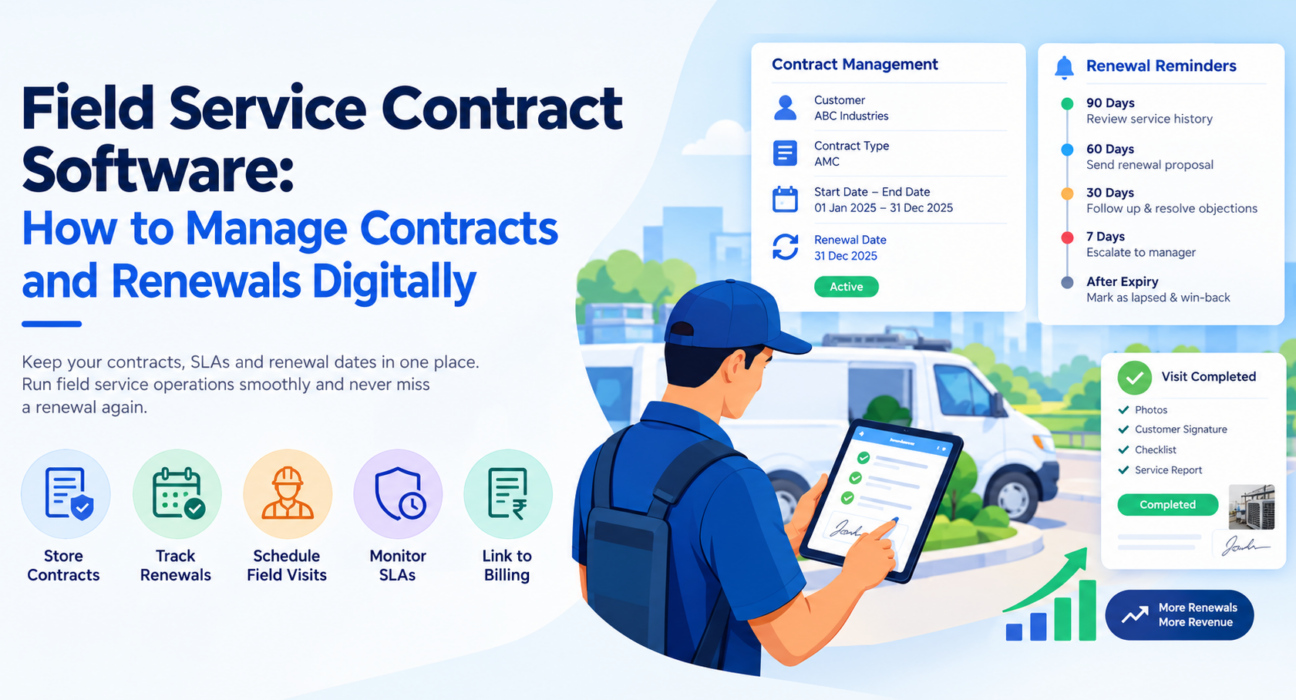
Here is a suggested cadence. Adjust it to your contract length and sales cycle:
| Timing before expiry | Action |
|---|---|
| 90 days | Review service history, SLA performance and open issues |
| 60 days | Send the renewal proposal or quote |
| 30 days | Follow up by call or visit and resolve objections |
| 7 days | Escalate unrenewed contracts to a manager |
| After expiry | Mark as lapsed and run a win-back follow-up |
The 90-day review matters because renewals are won or lost on service quality. If a customer had three missed visits and an SLA breach, the renewal conversation should start with fixing that, not with a quote.
Use service data to support the renewal conversation
Visit history, completed checklists and proof of service are your strongest renewal arguments. A summary showing every scheduled visit delivered on time is more persuasive than a price reminder. Customer feedback, such as an NPS score collected after each job, helps you spot at-risk accounts before they say so.
Key Features to Look For in Field Service Contract Software
Not every tool covers the full picture. Some are contract repositories, some handle field execution, and some are broader field service management (FSM) systems. Before you shortlist field service contract software, check which parts you actually need.
| Capability | Why it matters |
|---|---|
| Central contract and customer records | One source of truth for entitlements |
| Renewal reminders and expiry visibility | Prevents silent lapses |
| Task and visit scheduling | Turns contract terms into field work |
| SLA timers and escalation | Flags breaches while there is time to act |
| Proof of service (photo, signature, OTP) | Settles disputes and supports billing |
| Customizable forms and workflows | Matches your own job types and approvals |
| Collections and expense tracking | Connects service delivery to revenue |
| Real-time reports and KPIs | Shows contract health at a glance |
| Offline-capable mobile app | Keeps field teams working in low-network areas |
| Integrations with CRM, ERP and accounting | Avoids duplicate data entry |
For a broader view of how SLAs are structured and measured, Salesforce publishes a guide to service-level agreements.
Where Field Execution Fits Into Contract Management
Contract management does not end when the contract is signed. A contract is only worth renewing if the work was done, and that happens in the field.
Many businesses have a gap here. Their CRM or accounts system holds the contract, but visits are coordinated over calls and messages, and nobody can show whether the promised service happened. Closing that gap means connecting contract terms to dispatch, execution and proof.
How FieldExecutives Complements Field Service Contract Software
Businesses looking to simplify the field side of contract delivery can use field force management software such as FieldExecutives. It is built for teams that send people out to visit customers, service assets and collect payments, and it is used by field service and repair teams running AMC and SLA-based jobs.
Its features for contract delivery include:
- Task and visit assignment with checklists, priority and an SLA, delivered to the technician’s phone.
- SLA monitoring with timers, so managers see response and resolution deadlines in progress.
- Proof of visit through photo, signature and OTP capture, plus geofenced check-in.
- Custom forms and workflows to match your own job types, checklists and approvals without writing code.
- Collections tracking from the field through to settlement.
- Customer feedback and NPS, useful for spotting at-risk accounts before renewal.
- Real-time KPIs and reports for visit completion and SLA performance.
- Offline-first mobile apps, so technicians can finish jobs and capture proof without a network.
- API integrations with CRM, ERP, accounting and HR systems.
FieldExecutives is a field force management platform, not a dedicated contract repository. If you need clause-level contract storage or e-signature, the usual approach is to keep that in your CRM or ERP and connect it through APIs. FieldExecutives then handles dispatch, SLA tracking and proof of service. Pricing is a flat monthly plan by team size, listed on the pricing page. Confirm your specific requirements in a demo.
Common Mistakes to Avoid
- Treating renewals as a sales task only. Service delivery decides whether customers renew, so operations and sales need the same data.
- Storing contract terms only in documents. If terms never become scheduled visits, they are easy to miss.
- Skipping proof of service. Without evidence, disputes are your word against the customer’s.
- Starting renewal outreach too late. Waiting until the last week leaves no room to fix service problems.
- Choosing one tool by default. Pick based on whether your biggest gap is contract records, field execution, or both.
Conclusion:
Managing field service contracts and renewals digitally comes down to a few habits. Keep every contract in one record, turn contract terms into scheduled work, track SLAs while the clock is running, capture proof of service, and run renewals as a pipeline with early reminders and clear owners.